
Sequential Approval Workflow for Instagram (3-Stage Reviewer Chain Guide)
All-at-once approval is what every team does on Day 1. Three months later, half the company has commented on the same post, the contradictions are paralyzing, and the client is somewhere in the middle wondering why their feedback got buried. Sequential approval — a clean reviewer chain — is what teams adopt when the chaos becomes too expensive.
Why sequential beats all-at-once
All-at-once feels efficient: send the post to everyone, get all the feedback in parallel, ship it. In practice, it creates four predictable problems:
- • Contradictory feedback: the brand director says "more playful" while the legal reviewer says "more conservative." The author has to mediate.
- • Wasted reviewer time: the client sees a post the designer hasn't finished. They flag the half-baked version, then have to re-review the fixed one. Two reviews instead of one.
- • Comment collisions: two reviewers comment on the same caption simultaneously, both edit it, and one set of edits gets clobbered.
- • Unclear accountability: when 6 people approve, nobody approved. If something goes wrong, the audit trail is a mess.
Sequential approval solves all four by enforcing order: each stage has one job, must complete before the next begins, and the audit log shows exactly who blessed what at which point.
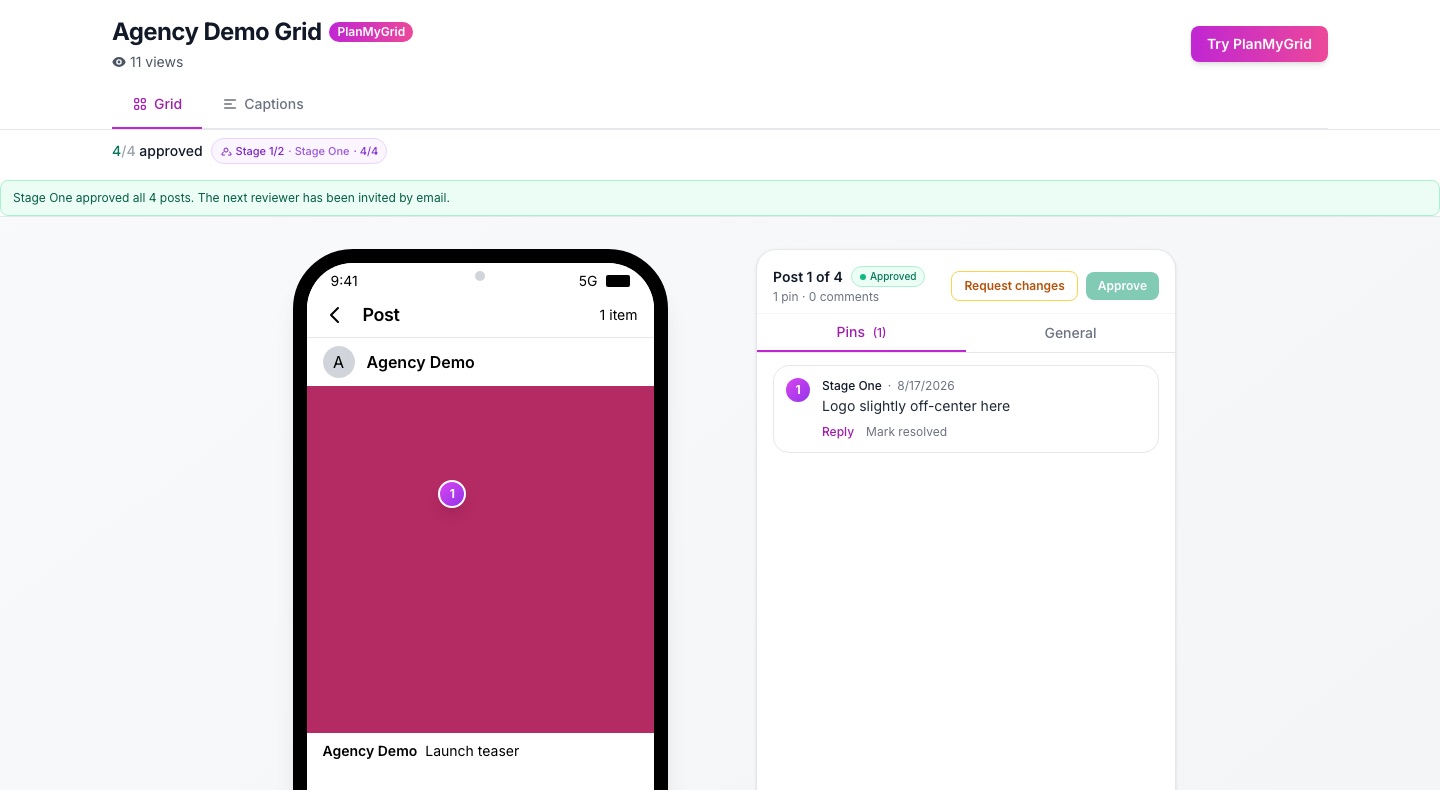
Try a 3-stage chain: Configure one in 30 seconds with a free PlanMyGrid trial. Reviewer chains are included starting on the Studio tier; full multi-brand chains on the Agency tier.
The canonical 3-stage chain
For most Instagram agency workflows, this is the chain that works:
Designer / content lead — Quality gate
Catches typos, brand consistency issues, broken aspect ratios, missing alt text. The first reviewer is the one closest to the work but with fresh eyes — usually a peer designer or content lead. Time-box: 4 hours from submission.
Account manager — Strategy gate
Checks alignment with the campaign, the client's tone, and any client-specific banned words or constraints. The AM owns the relationship and is the last line of defense before the client sees content. Time-box: same business day.
Client — Sign-off
Final approval. Client sees the post in grid context, approves, requests edits, or rejects. No login required — just a click on an email link. Time-box: 2 business days. Cycle time over that becomes a flag in your QBR.
Setting up the chain in PlanMyGrid
On Studio and Agency tiers, the reviewer chain UI lives on the share modal. Configuration is:
- Open the grid, click Share for Approval.
- Click Add reviewer chain.
- Add reviewers in order. Drag to reorder. Each reviewer can be a teammate (selected from your workspace) or an external email.
- Choose "require all stages" (default) or "owner can skip stages" (for trusting SMB clients where you want optional fast-tracking).
- Set the post-rejection routing: full restart at Stage 1 (safe default) or back to the rejecting stage (faster but riskier).
The chain saves to the workspace as a template, so the next grid in the same client gets the same chain by default. You can override per-grid as needed.
Common pitfalls and how to avoid them
- • Stage 1 reviewer is also the author. Defeats the purpose. Always have a second pair of eyes — even if it means a peer designer reviewing across teams.
- • No time-boxes per stage. A chain without time-boxes drifts. Set explicit SLAs per stage and surface stale items via daily digest.
- • Bypassing the chain "just this once." The fastest way to a broken process. Either fix the chain or follow it. Bypasses leak into culture.
- • No reopen path. Clients change their minds. Without reopen-after-signoff, you fork the post, lose history, and confuse the team. PlanMyGrid Studio+ ships reopen as a first-class action.
- • No analytics. If you cannot measure cycle time per client, you cannot fix it. Cycle time benchmark guide.
Beyond 3 stages: when to add complexity
The default is 3 stages. Add more only when a specific failure mode demands it:
- • Add Legal (Stage 2.5) when the client is in regulated industry (finance, health, alcohol).
- • Add Brand (Stage 2.5) when the client has multiple sub-brands and posts span them.
- • Add Client-side strategist (Stage 3a) when the client's own marketing director needs to approve before C-level sees content.
- • Add CEO (Stage 4) only for high-stakes campaigns. Routine content should never reach the CEO.
Each added stage adds 1+ business day to cycle time. Be honest about whether the value is worth the latency.
When real-time co-editing accelerates the chain
Sequential approval slows down only when a reviewer requests edits and the author has to find time to make them. With real-time co-editing, the AM and the designer can fix the post live during a 5-minute call — Stage 1 review and edit in one session. PlanMyGrid uses Yjs CRDT for this, the same engine behind Google Docs.
Frequently Asked Questions
What is a sequential approval workflow?
A sequential approval workflow is one where reviewers sign off in order — Stage 1 must approve before Stage 2 sees the content, and so on. It contrasts with parallel (all-at-once) approval where every reviewer sees the content simultaneously and can comment in any order.
When does parallel approval make sense?
Rarely, in agency content. Parallel works when reviewers have non-overlapping concerns and the content is low-stakes — for example, a quick legal sanity check happening alongside a brand check. Once you involve a client, sequential is almost always better because client time is the scarce resource and you do not want to waste it on half-finished content.
How many stages should an Instagram approval chain have?
Most agencies land on 3 stages (designer, AM, client). Regulated industries add a legal stage for 4. SMB clients sometimes collapse to 2 (designer + client). Beyond 5 stages, cycle time blows out and the chain becomes ceremonial rather than functional. We recommend starting at 3 and adding stages only when a specific failure mode demands it.
What happens when a reviewer rejects a post mid-chain?
On PlanMyGrid, rejection at any stage routes the post back to the post owner with the rejection reason. Once edited, it re-enters the chain at Stage 1 (full re-review) or at the rejecting stage, depending on configuration. Re-routing to Stage 1 is the safer default — earlier reviewers should re-check the post since their context may have shifted.
Ship a clean chain in your next grid
Reviewer chains and versions ship on Studio; reopen-after-signoff is Agency-only. See Agency. Start with a free trial and configure your first 3-stage chain in under a minute.