
The Instagram tool your clients will think you built.
White-label custom domain. 20 brand workspaces under one login. Pin-and-markup client approval without a client login. Manager / editor / viewer team seats. Real-time collaborative editing. Built for the way agencies actually run.
No credit card. White-label included on Agency from day one.
PlanMyGrid vs. Later vs. Planoly vs. Sprout
The features that matter when you're running 5+ client brands.
| Feature | PlanMyGrid | Later | Planoly | Sprout Social |
|---|---|---|---|---|
| White-label custom domain | Yes — Agency tier | No | No | Enterprise quote only |
| Workspaces under one login | Up to 20 brands | Per-workspace billing | Per-workspace billing | Profiles, not workspaces |
| Client approval without login | Yes — share link, no account | Yes — basic | Yes — basic | Internal approval only |
| Sequential reviewer chains | Yes | No | No | Yes — Advanced plan |
| Pin & markup comments on posts | Yes | No | No | Limited |
| Real-time collaborative editing | Yes — Yjs CRDT | No | No | No |
| Reply-by-email on shares | Yes — per-tenant inbound | No | No | No |
| Branded sender domain (DKIM/SPF) | Yes — Agency | No | No | Enterprise |
| Client media library per brand | Yes — Studio & Agency | No | No | Asset library, not per client |
| Client upload portal (no account) | Yes | No | No | No |
| Download links for client files | Yes — password & expiry | No | No | No |
| Visual planning canvas | Yes — Agency, real-time | No | No | No |
| Client credential vault | Yes — encrypted, audit-logged | No | No | No |
| Import your content calendar | Yes — CSV, any columns | No | No | No |
| Plan Facebook & LinkedIn | Yes — Agency, planning | Yes — publishing | Limited | Yes — publishing |
| Starting price for 5 brands | $29/mo | ~$80/mo | ~$100/mo | $249+/mo |
| Starting price for 20 brands | $99/mo | $300+/mo | $400+/mo | $500+/mo |
Be one of our first 5 agency case studies
Three months on Agency tier, free, in exchange for a quote and a logo we can put on this page. No locked-in commitment after month 4 — keep using it, downgrade, or walk away.
We're shipping fast. Tell us what's broken in your current stack and we'll prioritize it.
5 slots · first come, first served
Start where you are
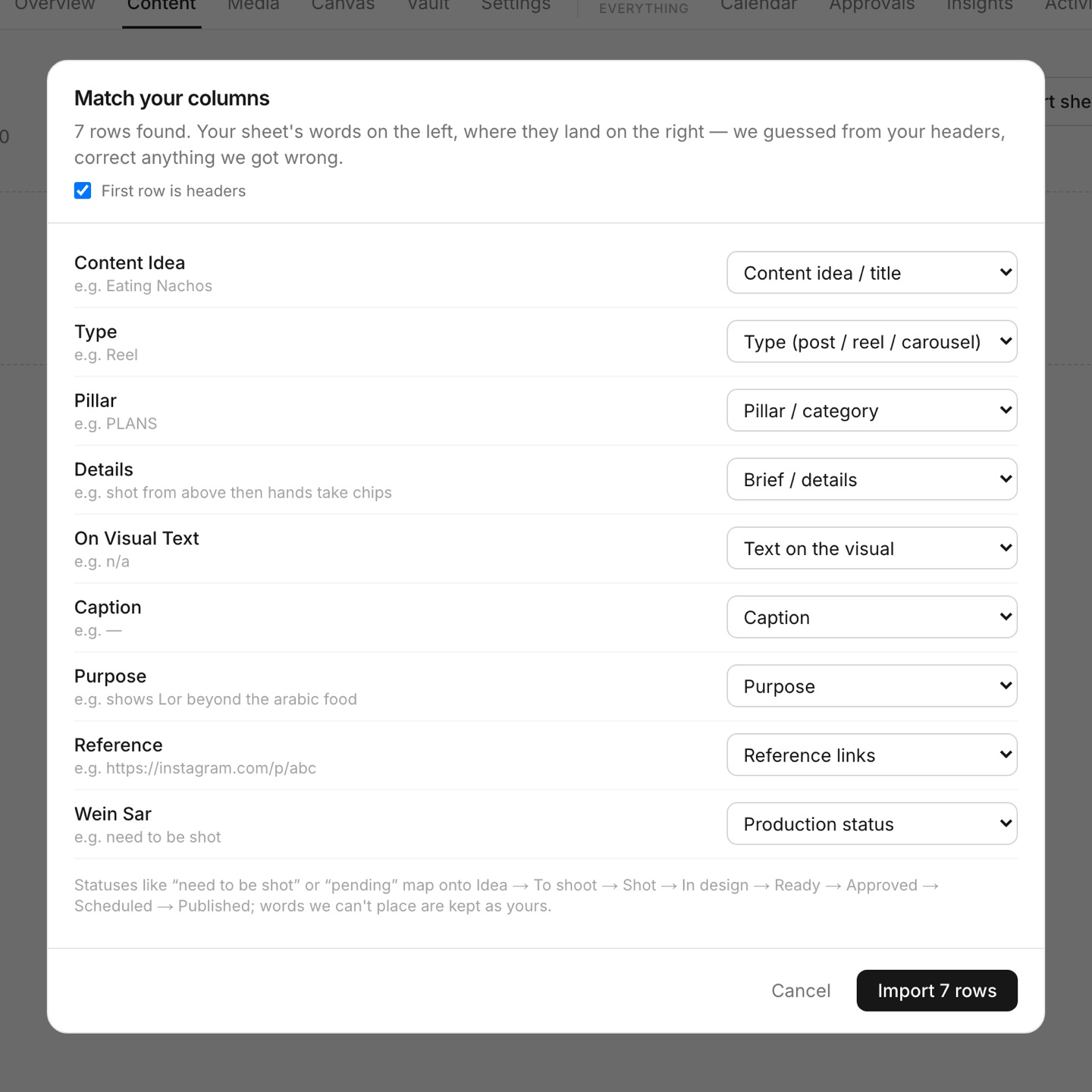
Your content sheet, in five minutes.
Every agency runs on a spreadsheet — the idea, the pillar, the brief for the designer, the caption, and a column tracking what still needs shooting. Import it. We read your column names, guess where each one belongs, and show you the guesses to correct. Your posts arrive with their briefs and statuses intact, ready to schedule, approve and publish — and the sheet stops being the thing everyone edits.
- Any columns, any headers — you confirm the mapping
- Statuses like “need to be shot” land in the right column
- Briefs, pillars and references come with the post
- Nothing to rebuild by hand
Client logins
Clients send passwords as PDFs. Stop them.
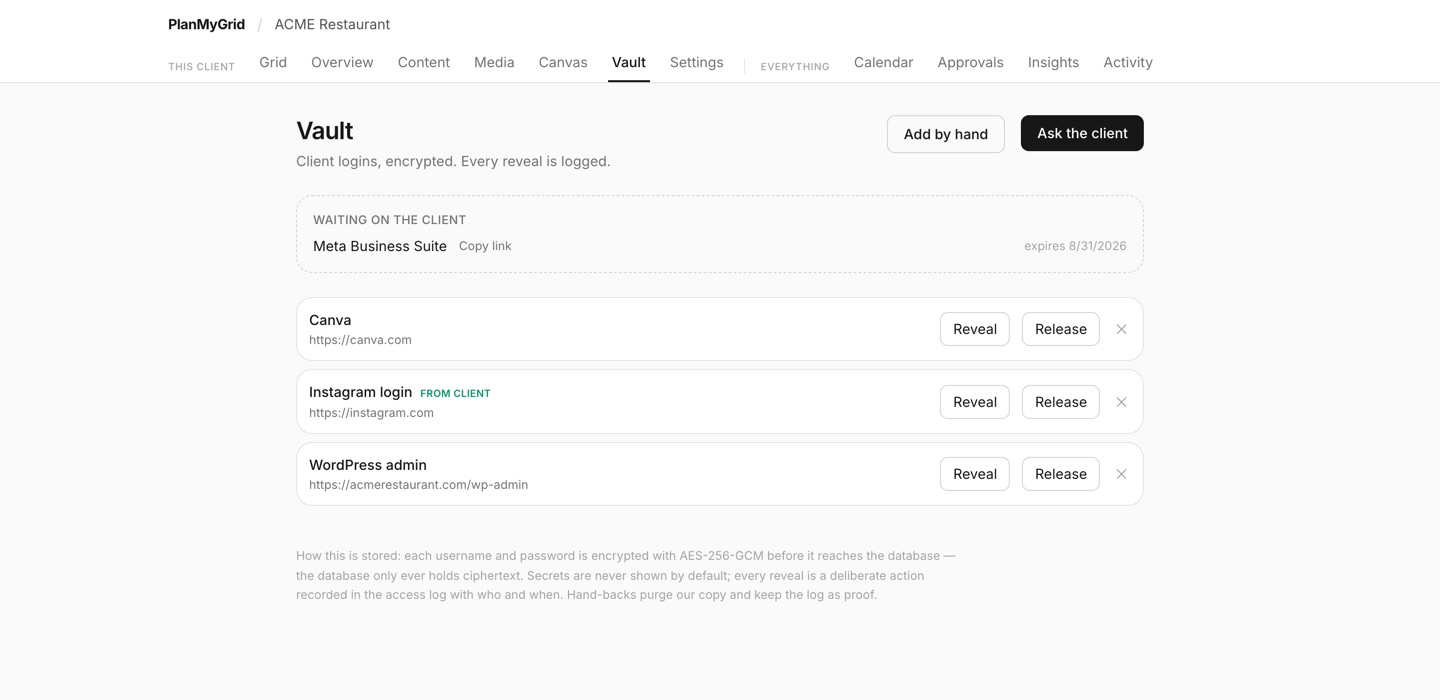
Every agency has received an email with a PDF of logins in it. The Vault replaces that: send the client a one-time link, they type the login into a page with your name on it, and the link dies the moment they submit. The login is stored encrypted — never in plain text — every reveal is logged, and when the engagement ends you hand it back with a one-time link that purges your copy. Works for anything: Instagram, Canva, Mailchimp, their website.
- One-time request links — no logins in email, ever
- AES-256-GCM encrypted at rest; reveals are logged
- Hand back with a one-time link that purges your copy
- The access log is your proof of careful handling
Plan it visually
Think on a whiteboard, not in a spreadsheet.
Every client gets an infinite canvas. Pull their photos straight in from the media library, sketch, annotate, and lay a month out before anything becomes a post. Your team works on it together in real time — you can see each other's cursors. When an idea is ready, turn it into a post in the grid without leaving the board. Internal only: clients never see it.
- Real-time collaboration with live cursors
- Drag client photos straight from their library
- Turn a selection into a post in one click
- Team-only — nothing here is client-visible

Beyond Instagram
Plan Facebook and LinkedIn beside the grid.
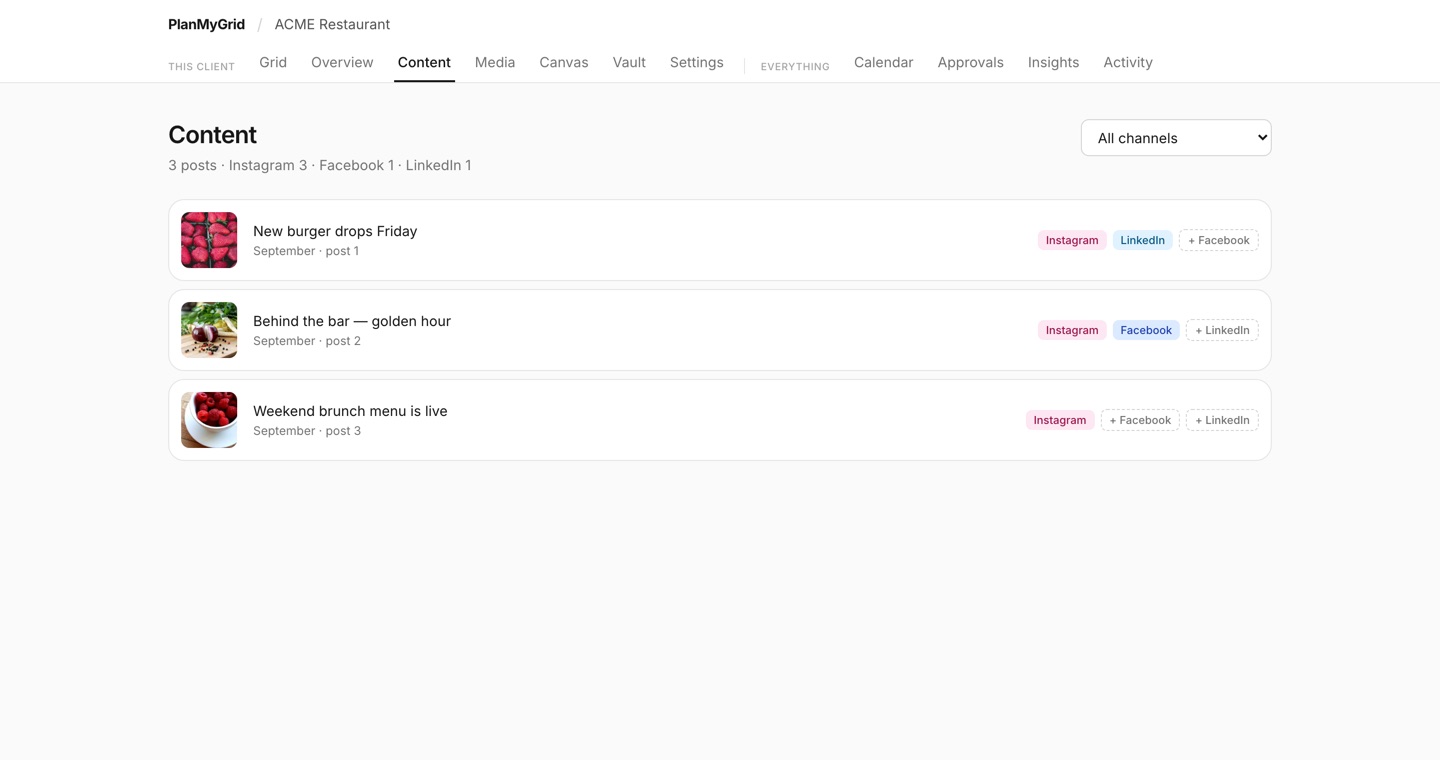
Agencies rarely run Instagram alone. The same post can carry a Facebook and a LinkedIn version, each with its own caption, images and date, starting from the Instagram post so you are not retyping. One content view shows every channel for a client, and planned posts land in the calendar next to what is queued to publish.
- Per-channel captions, images and dates
- One content list across every channel
- Planned posts appear in the calendar
- Planning only — we do not publish to these channels yet
Client media
Stop collecting client files on WhatsApp.
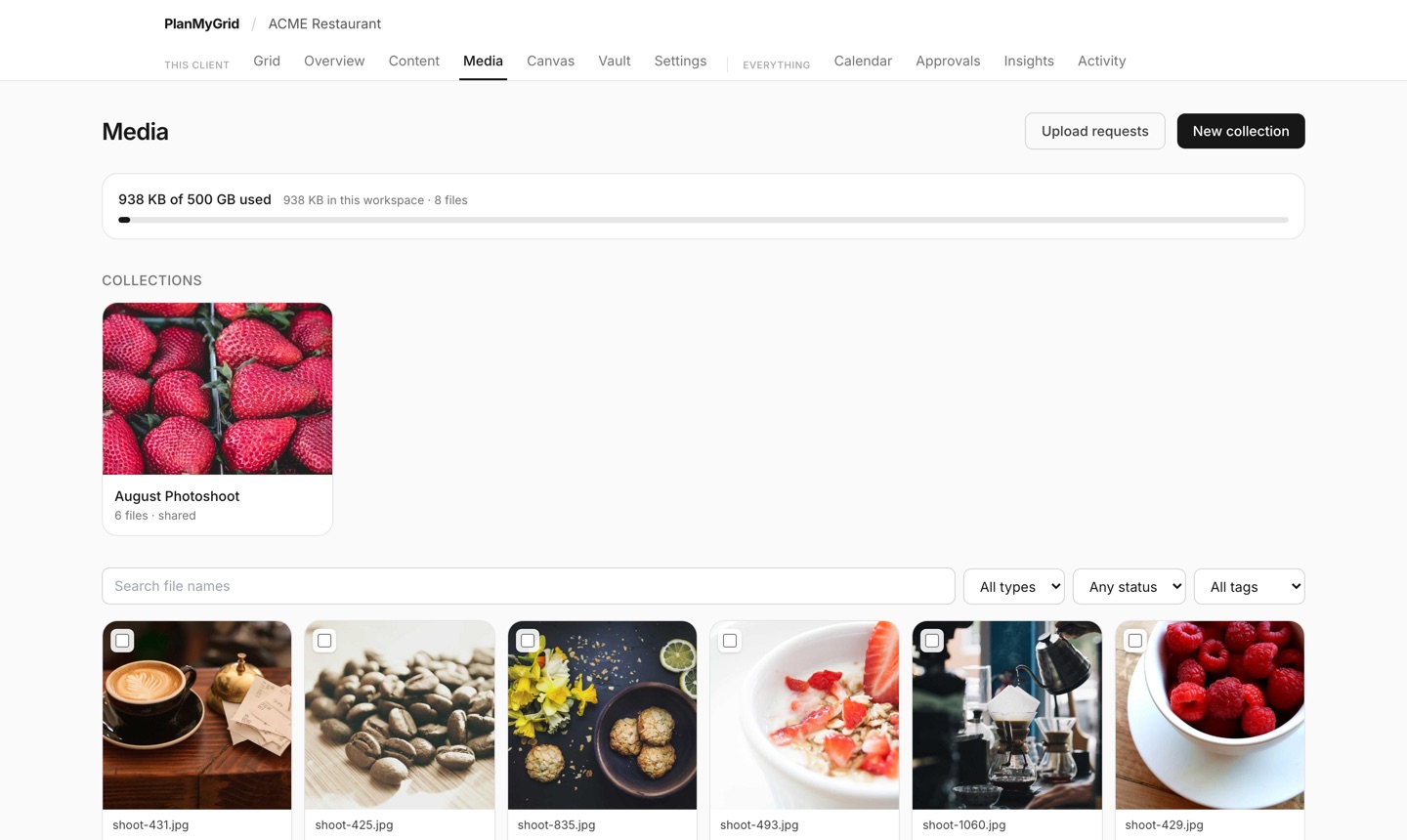
Every client gets a media library: their photos and videos in one place, tagged, grouped into collections, and marked so you can see at a glance what has already been used. Hand a shoot over with a download link. Ask for the next one with an upload link the client opens without an account.
- Client upload portals — no account, works on a phone
- Download links with password, expiry, and download-all
- Collections per shoot, campaign, or month
- See which grid or campaign already used an asset
White-label promise
Your domain. Your branding. No Powered-by.
Send client review links from share.youragency.com. Your logo on the share page, your accent color in the buttons, your favicon in the browser tab, your OG card on Slack previews. Powered-by footer removed on Agency. Clients never see PlanMyGrid — they see you.
- Custom share domain via CNAME, auto-issued TLS
- Branded transactional emails (logo + accent + footer)
- Branded OG previews when clients paste the link in Slack
- Per-workspace favicon override
Multi-brand workspaces
Manage 20 brands without 20 logins.
One PlanMyGrid login holds up to 20 isolated workspaces. Each workspace has its own grids, brand kit, share domain, and audit log. The cross-workspace approval dashboard, calendar, activity feed, and insights view roll everything up — so you stop tab-juggling and start managing your portfolio in one place.
- 20 brand workspaces on Agency (5 on Studio, 1 on Pro)
- Cross-workspace approval dashboard at /planner/approvals
- Cross-workspace calendar and unified insights
- Per-workspace slugs (per-owner namespace)
Client approval workflows
Pin, markup, and ship — without a client login.
Send a single link. The client pins comments on the exact pixel of the post, threads with you, suggests caption edits, and signs off — all without an account. Sequential reviewer chains enforce order at the API layer (creative director, then brand manager, then legal). Reopen-after-signoff is an Agency feature, for when scope changes after a client has signed off.
- Pin + markup + threaded comments on every post
- Sequential reviewer chains with hard enforcement
- Reopen after sign-off (Agency)
- Per-recipient resend for stale links
- Versioning so v3 doesn't get confused with v1
Team seats with roles
Manager, editor, viewer — billed by effective plan.
Invite your team with the right scope. Managers handle workspace settings and billing. Editors plan, schedule, and respond to clients. Viewers see the calendar and insights without write access. Seat quota and write capability follow the workspace owner's effective plan, so you don't overpay during quiet months.
- Manager / editor / viewer roles
- Workspace audit log per change
- Effective plan inherited from workspace owner
- Invite by email with magic-link onboarding
Real-time collaboration
Two strategists. One grid. No conflicts.
Yjs CRDT-backed multiplayer on every post and profile. Presence avatars show who is viewing what. IndexedDB persistence means edits made on a flaky cafe Wi-Fi sync the moment you reconnect — no lost captions. Highlights and stories still go through REST today; live editing covers the surfaces that matter most.
- Yjs CRDT over /ws/ — true conflict-free editing
- Presence avatars on the grid
- IndexedDB offline persistence
- Sync on reconnect, no manual save
Pricing summary
$99/mo for the whole agency lane.
Agency is the lane built for client work: white-label custom domain, 20 workspaces, full team seats, branded email sender domain, reply-by-email, sequential reviewer chains, a client media library with download and upload links, a real-time planning canvas, and Facebook and LinkedIn planning alongside the grid. If you bill more than $1,500/mo on social retainers, this pays for itself the first month you skip a Loom-and-Slack approval round.
- Agency: $99/mo — 20 workspaces, white-label, full team seats
- Studio: $29/mo — 5 workspaces, basic white-label
- 30% recurring referral on every account you bring in
- No annual lock-in, cancel any time
Questions agencies ask
- What does white-label actually cover on the Agency tier?
- Custom share domain (CNAME-pointed, auto-TLS), per-tenant email sender domain via Resend with DKIM/SPF/DMARC, inbound reply addresses like g-<code>@reply.youragency.com, branded transactional emails with your logo and accent color, branded OG previews on the custom host, custom favicon, and the Powered-by footer removed. Clients see your brand end-to-end.
- How many brand workspaces can I run on Agency?
- Up to 20 on Agency, 5 on Studio, 1 on Pro. Each workspace has isolated grids, brand kit, audit log, share domain, and team. Switching is one click — same login.
- Can I enforce a sign-off order across multiple reviewers?
- Yes. Reviewers are invited in sequence — stage 2 only receives its invitation once stage 1 has approved every post. Useful for creative director, then brand manager, then legal. Available on Studio and Agency.
- Do my clients need a PlanMyGrid login to review?
- No. The share link uses a magic code. They open it, leave pin comments, suggest caption edits, sign off — no account. You can scope access by recipient and resend stale links per-recipient.
- What roles do team seats support?
- Manager (workspace settings + billing), editor (plan, schedule, respond), and viewer (read-only). Seat quota and feature access follow the workspace owner's effective plan, so a viewer in an Agency workspace gets Agency-tier read access without a separate seat charge per feature.
- Is real-time collaboration limited to certain surfaces?
- Posts and the profile page (bio, highlights ordering, name) are Yjs-backed today. Highlights content and stories go through REST and pessimistic locks. We're shipping the rest of the surfaces over the next quarter.
- Do you offer a referral program for agencies that recommend the tool?
- Yes — 30% recurring on every account you bring in, paid monthly for the lifetime of the account. The link generator is at /planner/referrals once you're signed in.
Stop building Loom-and-Slack approval flows.
One link. Pin comments. Sign-off. White-label. 20 brands. Try Agency free — every feature unlocked.