
How to Get Instagram Posts Approved by Clients (Without Email Chains)
Email threads kill momentum. Clients lose context, feedback gets buried, and you end up re-explaining which post they were talking about. There's a better way.
Why Email Chains Fail for Instagram Approvals
You've drafted nine Instagram posts. Captions are written. Images are edited. You send the batch to your client for approval. What happens next is predictable and painful:
- Feedback without context. The client replies “I don't like the third one” but you're not sure which “third one” they mean—the third image in the email, the third row, or the third post from the left.
- Version confusion. You send a revised batch. The client replies to the original thread with feedback on the old version. Now there are two conversations about two different drafts.
- Lost feedback. The client's comment about the caption for post #7 is buried in a reply-all chain between four people. Nobody can find it when it's time to make edits.
- No clear status. Which posts are approved? Which need changes? You end up building a spreadsheet just to track the state of nine posts.
The core problem is that email is flat. Instagram content is spatial—it lives in a grid, each post has its own image and caption, and feedback needs to be anchored to a specific post. A dedicated Instagram client approval workflow solves all of this.
What a Good Instagram Approval Workflow Looks Like
A proper approval workflow replaces email with a structured process. Here's what that looks like in practice:
Creator shares the grid
You send a single link. The client sees the planned grid exactly as it will appear on Instagram—images in position, captions attached.
Client reviews individual posts
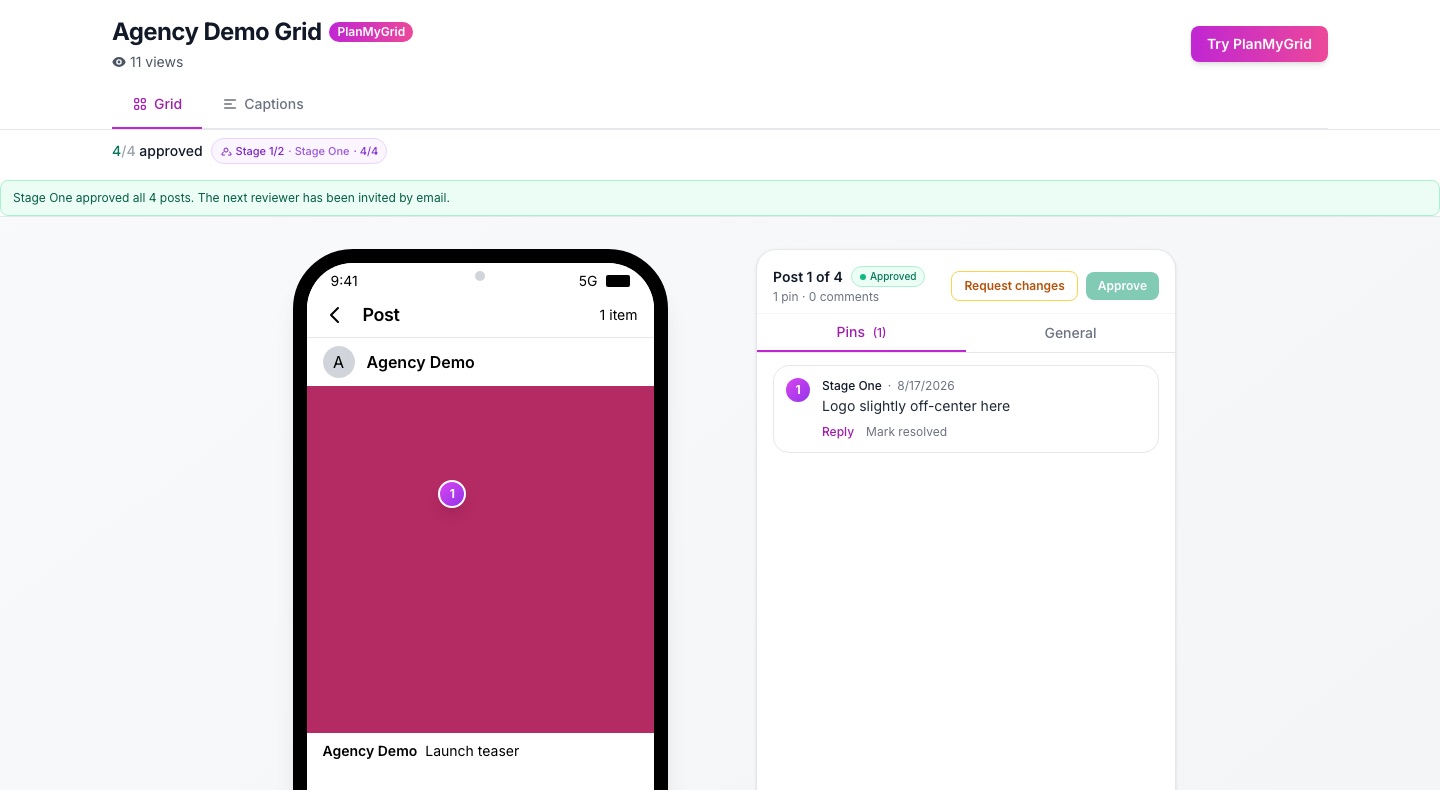
No batch approval. The client clicks on each post, sees the full-size image and caption, and gives feedback on that specific post.
Approve, reject, or request revision
Each post gets a clear status. The client can approve most posts and flag specific ones that need changes, with comments explaining exactly what to fix.
Creator sees results instantly
You get a summary: 7 approved, 1 needs revision, 1 rejected. Each piece of feedback is attached to the post it refers to. No digging through email.
How PlanMyGrid's Approval Workflow Works
PlanMyGrid builds client approval directly into the grid planning process. Here's how it works from start to finish:
1. Plan your grid with drag-and-drop
Upload your images, arrange them in the grid, add captions. Use PlanMyGrid's AI caption generator to create starting drafts if you want to save time. The grid preview shows exactly how posts will look on Instagram.
2. Enable approval mode when sharing
When you share your grid, toggle on approval mode. This creates a special share link where the recipient can do more than just view—they can approve, reject, or request revisions on each post.
3. Client clicks the link (no login needed)
Your client receives the link and opens it in any browser. They see the full grid layout. No account creation, no app download, no password to remember. They're reviewing content within seconds.
4. Client approves or rejects each post with comments
The client taps any post to see the full image and caption. They choose one of three actions: approve, reject, or request revision. For rejections and revision requests, they add a comment explaining what needs to change.
5. You get email notifications and a feedback summary
PlanMyGrid sends you an email when the client submits feedback. Back in your dashboard, you see a clear summary: which posts are approved, which need changes, and the exact comments tied to each post. No hunting through threads.
Why Per-Post Feedback Beats Full-Grid Approval
Most approval tools treat a content batch as one unit: approve the whole thing or reject the whole thing. That creates unnecessary work. If a client dislikes one post out of nine, you shouldn't have to resubmit all nine for review.
Full-grid approval
- • Client rejects entire batch over one issue
- • You revise and resubmit everything
- • Client re-reviews posts they already approved
- • Multiple revision cycles for minor changes
Per-post approval
- • Client approves 8/9 posts, flags one
- • You fix only the flagged post
- • Client reviews only the updated post
- • One revision cycle, done
Per-post approval also gives you better data. Over time, you learn what types of content clients consistently approve and where friction happens. That makes future batches faster to get through.
5 Tips for Faster Client Approvals
1. Provide context upfront
Add a brief note to your share link explaining the theme, campaign goal, or posting schedule. When clients understand the “why” behind a post, they give faster and more useful feedback.
2. Use AI captions as starting points
PlanMyGrid's AI caption generator gives you a solid draft in seconds. Clients respond better to a polished draft than a placeholder like “caption TBD.” Even if they request changes, having a real caption speeds up the conversation.
3. Set a deadline in your message
When sending the approval link, include a clear deadline: “Please review by Thursday 5 PM so we can publish Friday.” Without a deadline, approvals sit in inboxes indefinitely.
4. Batch content by theme or week
Don't send one post at a time for approval. Group posts into logical batches—a week's content or a campaign set. Clients prefer reviewing 6–12 posts in one session over approving them one by one over several days.
5. Keep your grid clean
Remove placeholder images and unfinished posts before sharing. A polished grid signals professionalism and reduces “is this final?” questions from clients.
Free vs Pro: What You Get for Approval Workflows
PlanMyGrid's approval features are available on both plans, with Pro unlocking the full workflow:
Free Plan
- Share approval links with clients
- Client reviews without login
- Basic approve/reject per post
- Full revision comments
- Email notifications
Pro Plan — $9/month
- Everything in Free
- Detailed revision comments per post
- Email notifications on feedback
- Feedback summary dashboard
- Unlimited grids and share links
Frequently Asked Questions
Do clients need to create an account to approve Instagram posts?
No. With PlanMyGrid, clients click a share link and can immediately review, approve, reject, or request revisions on each post. No account creation, no app download, no login required.
What is per-post approval and why is it better than full-grid approval?
Per-post approval lets clients give feedback on each individual post in your grid rather than approving or rejecting the entire batch. This means a client can approve 8 out of 9 posts and flag only the one that needs changes, saving time and avoiding unnecessary revision cycles.
Can I use Instagram client approval on a free plan?
Yes. Free PlanMyGrid users can share approval links with clients. Pro users ($9/month) unlock full feedback access including detailed revision comments, email notifications, and feedback summaries across all grids.
Stop Chasing Approvals in Email
Plan your grid, share with your client, and get per-post feedback in one place. No login required for clients. Free to start.
Start Planning Your Grid