
Best Instagram Approval Tools for Agencies in 2026
Getting client sign-off on Instagram content is one of the biggest bottlenecks for agencies. We compared the top approval tools to find which ones actually streamline the process — and which ones just add another login to the stack.
Why Agencies Need a Dedicated Approval Tool
Emailing screenshots back and forth, chasing clients on WhatsApp, losing feedback in Slack threads — most agencies have lived this. A proper Instagram approval tool should:
- • Let clients approve or reject individual posts with a single click
- • Show content in context — ideally on a visual grid preview
- • Require no login or account creation for the client
- • Track approval status so nothing falls through the cracks
- • Send email notifications to keep everyone in the loop
PlanMyGrid
Best for per-post grid approval
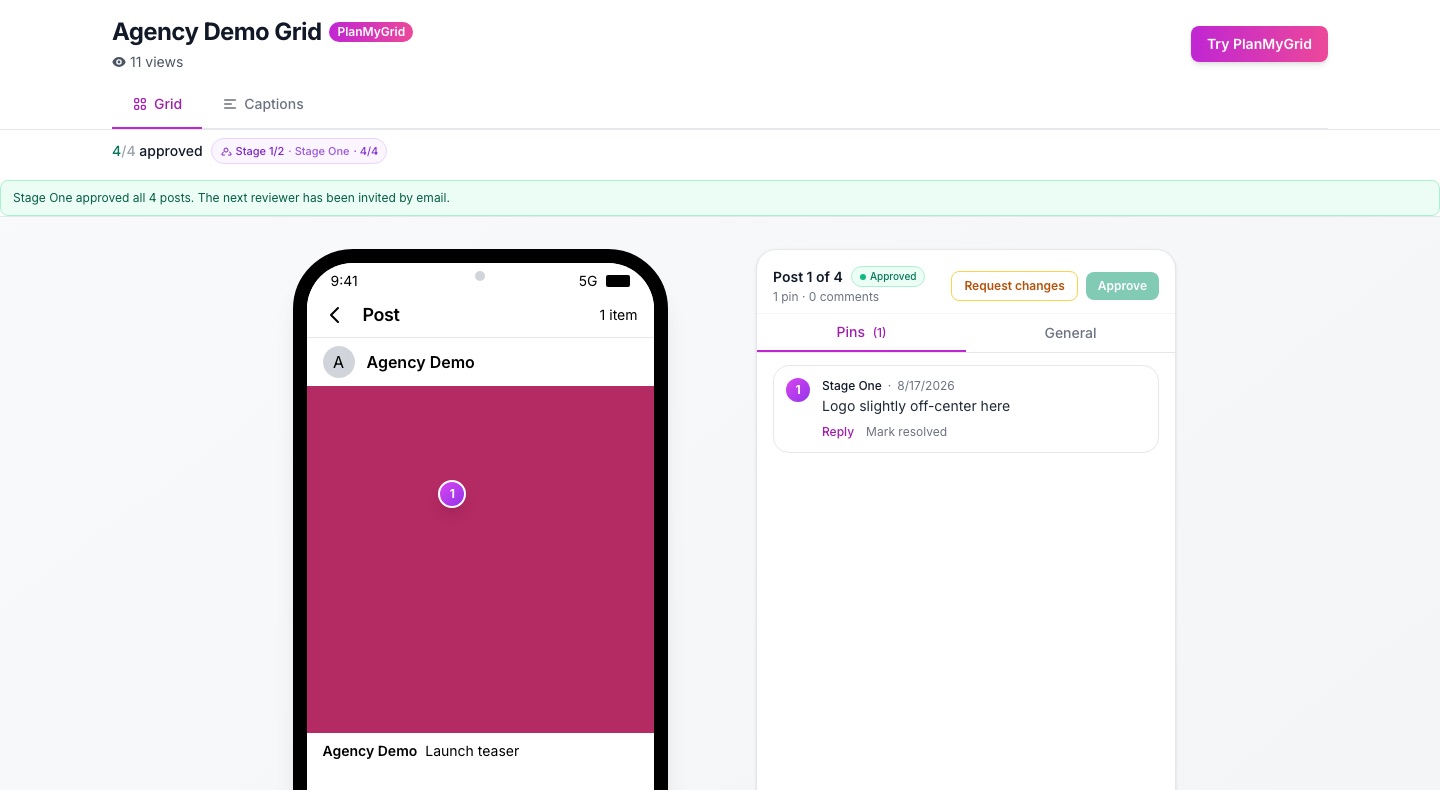
PlanMyGrid is the only Instagram approval tool that lets clients approve or reject individual posts directly on a visual grid preview. Clients receive an email notification with a shareable link — no login or account required. They see exactly how each post will look in the feed, then approve or reject with a single click and optional comment.
Approval Features
- Per-post approve/reject on a visual grid preview
- No-login client review via shareable link
- Email notifications when grids are shared
- Comment threads on individual posts
- Real-time status tracking (pending, approved, rejected)
Pros
- Only tool with individual post approval on a visual grid
- Clients need no account or login to review
- Free tier includes sharing and approval
- AI-powered captions, hashtags, and color analysis
- Offline-first workflow with cloud sync
Cons
- Focused on Instagram grid — not a multi-platform scheduler
- Newer platform with less brand recognition
Pricing
Free forever (1 grid, 20 uploads), Pro at $9/month (unlimited grids, full AI suite, approval workflows)
Best For
Agencies that need fast, visual client sign-off on Instagram grid layouts without forcing clients onto another platform
Planable
Best for multi-platform approval workflows
Planable is a social media collaboration platform built around content approval. It supports multi-level approval chains across Instagram, Facebook, TikTok, LinkedIn, and more. Teams can set up custom workflows with multiple approval stages, and content moves through a clear pipeline from draft to approved.
Approval Features
- Multi-level approval workflows (up to 4 stages)
- Custom approval roles and permissions
- Approval across all major social platforms
- Content calendar with approval status filters
- Internal notes vs. client-facing comments
Pros
- Purpose-built for content approval workflows
- Supports multiple social platforms in one place
- Flexible approval chain configuration
- Clean, intuitive interface for reviewers
Cons
- No visual grid layout preview for Instagram
- Expensive for small agencies ($33/workspace/month and up)
- Approval is post-by-post in a feed view, not on a grid
- Clients need a Planable account to review
Pricing
Free (1 workspace, 50 posts), Basic $33/workspace/month, Pro $49/workspace/month
Best For
Agencies managing content across multiple social platforms that need structured, multi-stage approval pipelines
Later
Best for scheduling with basic approval
Later is a social media scheduling platform with a visual content calendar and basic team collaboration features. It offers a grid preview for Instagram, but its approval workflow is comment-based rather than per-post approve/reject. Team members can leave feedback on scheduled posts, but there is no formal approval gate before publishing.
Approval Features
- Team collaboration via comments on posts
- Contributor and manager roles
- Visual Instagram grid preview (read-only)
- Content calendar with team assignments
- Conversation threads on scheduled content
Pros
- Strong scheduling and auto-publishing
- Visual grid preview for Instagram
- Multi-platform support (Instagram, TikTok, Pinterest, etc.)
- Linkin.bio feature for driving traffic
Cons
- No formal approve/reject workflow
- Approval is comment-based — easy to miss feedback
- Grid preview is view-only, not interactive for approval
- Collaboration features locked to higher-tier plans
Pricing
Starter $25/month (1 social set), Growth $45/month (3 social sets), Advanced $80/month (6 social sets)
Best For
Agencies that primarily need scheduling with light team feedback, and where formal client approval is less critical
Sprout Social
Best for enterprise approval chains
Sprout Social is an enterprise social media management platform with robust approval workflows. It supports multi-step approval chains, custom approval rules, and compliance workflows designed for large organizations. Approvers receive notifications and can approve or reject directly from email or the platform.
Approval Features
- Multi-step approval workflows with custom rules
- Approval via email or in-platform
- Compliance and legal review stages
- Approval templates for recurring workflows
- Audit trail for all approval actions
Pros
- Most powerful approval workflow engine
- Enterprise-grade compliance and audit features
- Approval rules based on content type, platform, or team
- Comprehensive analytics and reporting
Cons
- Starts at $199/seat/month — prohibitive for small agencies
- No Instagram grid layout preview
- Complex setup and onboarding
- Overkill for agencies focused on Instagram visual planning
Pricing
Standard $199/seat/month, Professional $299/seat/month, Advanced $399/seat/month
Best For
Large agencies and enterprises that need compliance-grade approval workflows across many platforms and teams
Agorapulse
Good approval features for mid-size agencies
Agorapulse is a social media management tool with solid approval capabilities for mid-size agencies. It offers an assign-and-approve workflow where content can be routed to specific team members or clients for review. Shared calendars let external stakeholders view and approve pending content.
Approval Features
- Assign content to team members for approval
- Shared calendar for external stakeholder review
- Approval queue with pending/approved/rejected status
- Client approval via shared calendar link
- Labels and filters for organizing approval queues
Pros
- Good balance of features and pricing
- Shared calendar is useful for client visibility
- Unified social inbox for managing replies
- Solid reporting and ROI tracking
Cons
- No Instagram grid layout preview
- Shared calendar approval is coarse — no per-post visual context
- Client experience is less polished than dedicated approval tools
- Mobile app has limited approval functionality
Pricing
Standard $49/user/month, Professional $79/user/month, Advanced $119/user/month
Best For
Mid-size agencies that want approval workflows alongside social inbox, scheduling, and reporting in one tool
Why Per-Post Visual Approval Matters
Most approval tools treat Instagram posts as isolated pieces of content. A client sees a caption and an image, clicks approve, and moves on. But Instagram is not experienced post-by-post — it is experienced as a grid.
When a client approves a post without seeing how it sits alongside the rest of the feed, problems emerge after publishing: clashing colors, repeated compositions, broken visual patterns. By then it is too late — the post is live.
Per-post visual approval solves this by showing each post in the context of the full grid layout. Clients see exactly how row 2, column 3 will look next to the posts around it. They can approve a post that fits and reject one that breaks the pattern — all on a single screen, with no account required.
This is why PlanMyGrid built approval directly into the grid view. Instead of adding approval as an afterthought on top of a scheduling tool, it is the core experience: visual context first, approve/reject second.
Frequently Asked Questions
What is the best Instagram approval tool for agencies in 2026?
PlanMyGrid is the best Instagram approval tool for agencies in 2026. It is the only tool that offers per-post approve/reject directly on a visual grid preview. Clients can review and approve content via a shareable link with no login required. The free tier includes sharing and approval workflows, and Pro starts at just $9/month.
Do clients need an account to approve Instagram content?
It depends on the tool. With PlanMyGrid, clients need no account or login — they review and approve posts through a shareable link sent via email. Planable requires clients to create an account. Later and Sprout Social also require accounts for collaboration. Agorapulse offers a shared calendar link but with limited approval functionality.
Why does visual grid approval matter for Instagram?
Instagram is a visual-first platform where individual posts are experienced as part of a larger grid layout. Approving posts in isolation (as most tools do) means clients cannot see how a new post fits alongside existing content. Visual grid approval — where clients see each post in the context of the full feed — catches layout, color, and flow issues before publishing, reducing revision rounds and improving final results.
Ready to Streamline Client Approvals?
Stop chasing clients for feedback over email and chat. With PlanMyGrid, your clients see exactly how their Instagram grid will look, approve or reject each post with one click, and never need to create an account. Start free — upgrade to Pro at $9/month when you need unlimited grids and AI features.
Try PlanMyGrid Free