
Instagram Client Approval: How to Get Posts Approved Before Publishing
Stop losing feedback in email threads. Learn how to build a smooth Instagram client approval workflow that gets content signed off faster and keeps everyone aligned.
Why You Need a Client Approval Workflow for Instagram
If you manage Instagram accounts for clients, you already know the drill: you plan the perfect grid, write the captions, pick the hashtags, and then... you wait. You wait for your client to say "looks good" before anything goes live.
Without a structured Instagram client approval workflow, that waiting period turns into chaos. Feedback gets buried in email threads. Clients forget which posts they already reviewed. Revisions pile up with no clear tracking. And worst of all, your carefully planned content calendar slips by days or even weeks.
A proper social media approval process does more than just speed things up. It protects you from posting unapproved content, creates a paper trail of who approved what, and gives your clients confidence that nothing goes live without their sign-off. Whether you manage one account or twenty, an approval workflow is the difference between running a professional operation and scrambling to keep up.
The Typical Approval Bottleneck
Most social media managers and agencies still rely on a patchwork of tools to get content approved. The typical process looks something like this:
The Email Chain Problem
You send a batch of posts as image attachments or screenshots. The client replies with feedback on "the third one" without specifying which. You reply asking for clarification. Two days pass. You send a follow-up. They respond to the wrong thread with new feedback that contradicts their earlier notes.
Lost Feedback
When feedback lives across email, Slack, WhatsApp, and text messages, things get lost. That caption tweak your client mentioned on a call? Gone. The "I like this one but change the filter" comment buried in a 47-message thread? Good luck finding it.
No Clear Status Tracking
Without a centralized system, you can never tell at a glance which posts are approved, which need revisions, and which haven't been reviewed yet. You end up maintaining spreadsheets or mental notes, both of which fail at scale.
Calendar Delays
Every day of delayed approval is a day your content calendar slips. Seasonal posts miss their window. Trending topics become stale. Your carefully planned consistent Instagram feed falls apart because posts go live out of order.
What a Good Approval Workflow Looks Like
A well-designed social media approval process follows four clear stages. Every post moves through these stages in order, and both you and your client can see exactly where things stand at any moment.
Share
You prepare your grid with all the posts, captions, and scheduling details, then share it with your client through a single link. No attachments, no screenshots, no back-and-forth about file formats.
Review
Your client opens the link and sees exactly how the posts will look in the grid layout. They can review each post individually, reading captions and seeing the visual in context of the overall feed.
Decide
For each post, the client can approve it, reject it, or request a revision with specific feedback. No ambiguity, no "the third one" confusion. Every decision is tied to a specific post.
Post
Once approved, you schedule or publish with confidence. There is a clear record of client sign-off, so there are no surprises and no "I never approved that" conversations later.
How PlanMyGrid's Client Approval Works
PlanMyGrid has a dedicated client approval mode built right into the grid planner. Instead of cobbling together screenshots and email threads, you get a streamlined Instagram approval tool that both you and your clients will actually enjoy using.
Share with Approval Mode Enabled
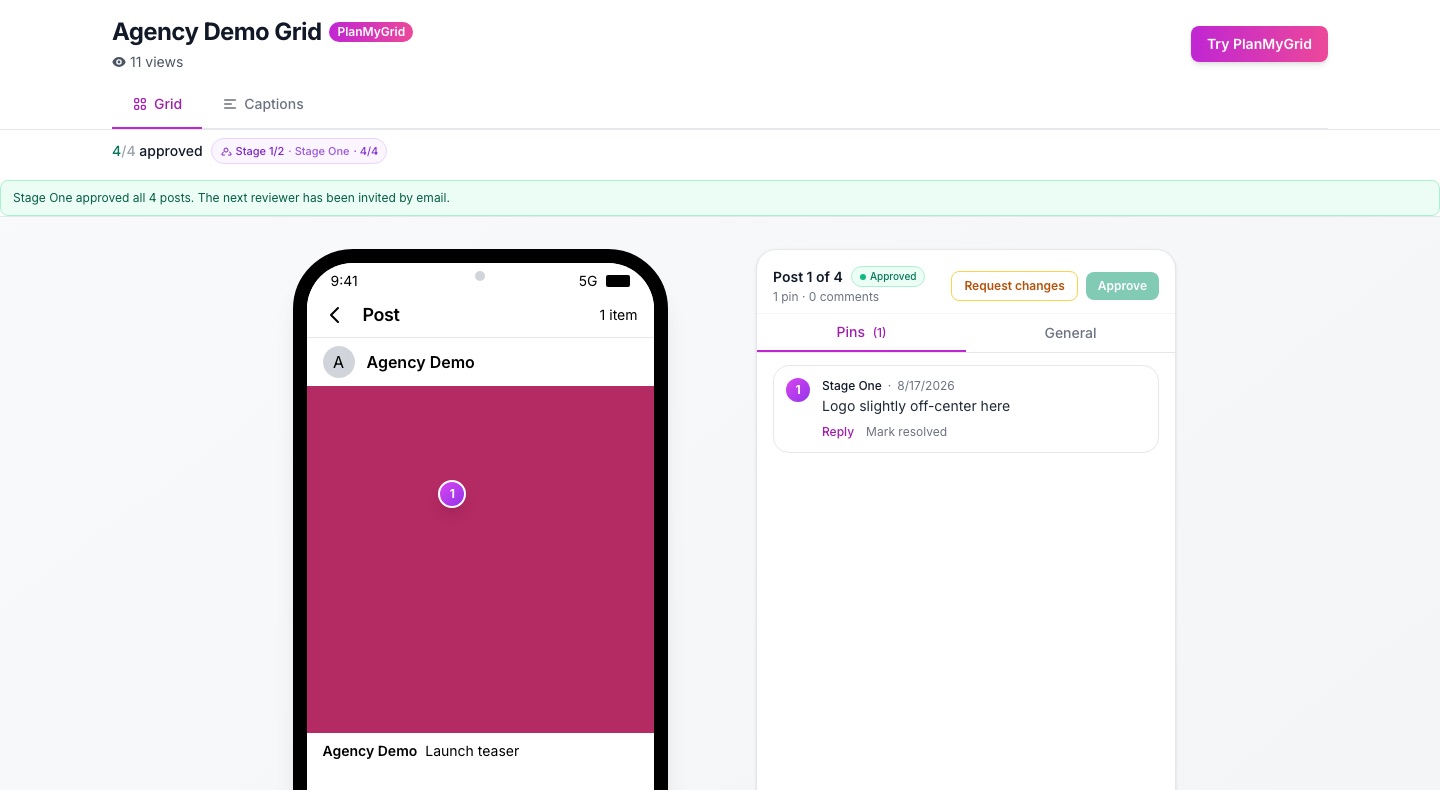
When you share a grid, you can toggle on approval mode. This generates a special share link where your client sees each post with approve, reject, and request revision buttons. They see the full grid layout, individual post details, and captions, giving them complete context for their decisions.
Per-Post Feedback
Clients can approve or reject individual posts and leave specific revision notes on each one. No more guessing which post they meant. Every piece of feedback is attached directly to the content it refers to.
No Login Required for Clients
Your clients never need to create an account or remember a password. They just click the share link and start reviewing. This removes the biggest friction point in any approval workflow: getting your client to actually log in and look at the content.
Email Notifications
You get email notifications when your client reviews posts, so you never have to wonder whether they have looked at the content yet. As soon as they approve, reject, or request changes, you know immediately.
Setting Up Your First Approval Workflow
Getting started with PlanMyGrid's Instagram client approval workflow takes about two minutes. Here is a step-by-step walkthrough.
Step 1: Build Your Grid
Open the PlanMyGrid app and create a new grid for your client. Upload the images you have prepared, drag and drop them into the right order, and add captions. Use the grid preview to check that the overall feed looks cohesive.
Step 2: Enable Approval Mode
Click the share button and toggle on "Client Approval" mode. This transforms the share link from a view-only preview into an interactive approval page where your client can take action on each post.
Step 3: Send the Link
Copy the share link and send it to your client via email, Slack, or wherever you normally communicate. The link works on any device, including mobile, so your client can review from anywhere.
Step 4: Review Their Feedback
When your client reviews the grid, you will get email notifications. Open PlanMyGrid to see which posts were approved, which were rejected, and which need revisions. Any revision notes from your client are attached to the specific post.
Step 5: Revise and Resubmit
Make the requested changes, update the grid, and the client can review again through the same link. Repeat until everything is approved, then schedule or publish your content with confidence.
Tips for Faster Approvals
Even with the right tools, approvals can drag if you do not set expectations upfront. Here are six strategies that consistently speed up the social media approval process.
1. Set a Review Deadline
When you send the approval link, include a specific deadline. "Please review by Wednesday at noon" is far more effective than "let me know when you get a chance." Tie it to your posting schedule so clients understand why timing matters.
2. Batch Your Submissions
Send a full week or two weeks of content for review at once rather than individual posts. This gives your client one focused review session instead of constant interruptions. PlanMyGrid's grid view makes batch review natural since clients see all posts in context.
3. Provide Context in Captions
Include your full captions and any scheduling notes with each post. The more context your client has, the fewer questions they need to ask and the faster they can make decisions.
4. Use a Brand Kit
When your content consistently matches the client's brand voice, there are fewer revision rounds. PlanMyGrid's brand kit feature lets you define brand colors, tone of voice, and style guidelines so AI-generated captions and content align with client expectations from the start.
5. Limit Revision Rounds
Agree upfront on how many revision rounds are included (two is standard in most agency contracts). This prevents the endless back-and-forth that kills timelines and morale.
6. Show the Grid, Not Just Individual Posts
Clients approve faster when they can see how posts fit together in the overall feed. A single post might look off on its own but make perfect sense in the grid. PlanMyGrid's grid preview gives clients this context automatically, reducing unnecessary rejections.
Free vs. Pro for Client Approval
PlanMyGrid's free tier includes basic share links so you can get started right away. When you are ready for the full client approval workflow with per-post approve/reject/revise actions and email notifications, the Pro plan has you covered at $9/month.
Free Tier
- Basic share links
- Grid preview for clients
- 1 grid, 20 media uploads, 2 AI tries
Pro ($9/month)
- Full approval mode (approve/reject/revise)
- Email notifications on review
- Unlimited grids, media, and shares
- AI captions, brand kit, content calendar
Stop Chasing Approvals. Start Getting Them.
PlanMyGrid gives social media managers and agencies a professional Instagram client approval workflow out of the box. Share your grid, get per-post feedback, and know exactly when content is approved. No more email chains, no more lost feedback, no more missed deadlines.