
How do you share an Instagram grid preview with a client?
The best way to share an Instagram grid preview with a client is a live share link: the client opens it in a browser, with no account, and sees the planned feed in the real order inside a phone frame. Screenshots and mockups show the look, but feedback then comes back in email as “the third one on the second row”. A share link from a grid planner such as PlanMyGrid keeps the comments, and the sign-off, on the post they are about.
The short answer
- • Just need the client to see the look? A PlanMyGrid share link works on the free plan (one link) and Pro at $9 per month (unlimited).
- • Need a recorded yes or no on every post? Turn on approval mode on Studio ($29 per month) or Agency ($99 per month).
- • Need the page to carry your agency's brand? Studio shows your name and logo. Agency adds your own domain.
Screenshots, mockups or a live link: which works best?
All three show a client roughly what the feed will look like. They differ in what happens after the client has an opinion.
| Method | Looks like Instagram? | After you edit | Client feedback | Sign-off |
|---|---|---|---|---|
| Screenshots from a preview app | Yes, for one moment in time | No. You send new screenshots | In email or chat, by description (“the third one”) | No record |
| Mockup in a design tool or slide deck | Close, if the template matches the current Instagram layout | No. You re-export and resend | Comments on the file, if the client has access | No record |
| Live share link from a grid planner | Yes, the real order in a phone frame | Same link. You push an update | On the exact post, with a pin on the image | Per-post approve or request changes (PlanMyGrid Studio and Agency) |
Screenshots are fine for a one-off check with a client you talk to every day. Once there is more than one round of changes, or more than one person who has to say yes, the live link saves the most time.
How do you share a grid preview in PlanMyGrid?
- Plan the grid. Upload the posts, Reels and carousels and drag them into order. Add Stories and Highlights if the client should see those too.
- Click Share on the grid to create a link.
- Choose the mode. Leave it as a preview the client can view and comment on, or turn on approval mode (Studio and Agency) and add the client's email and a due date. You can also limit how many times the link opens.
- Send the link in email or chat, or let PlanMyGrid email the client for you.
- Read the feedback. The client taps a post to comment, or drops a numbered pin on the exact spot in the image. In approval mode, each post gets Approve or Request changes.
- Update the same link. Make the edits in the grid, then update the link, or submit a new version in approval mode. The client opens the same URL and sees the new plan.
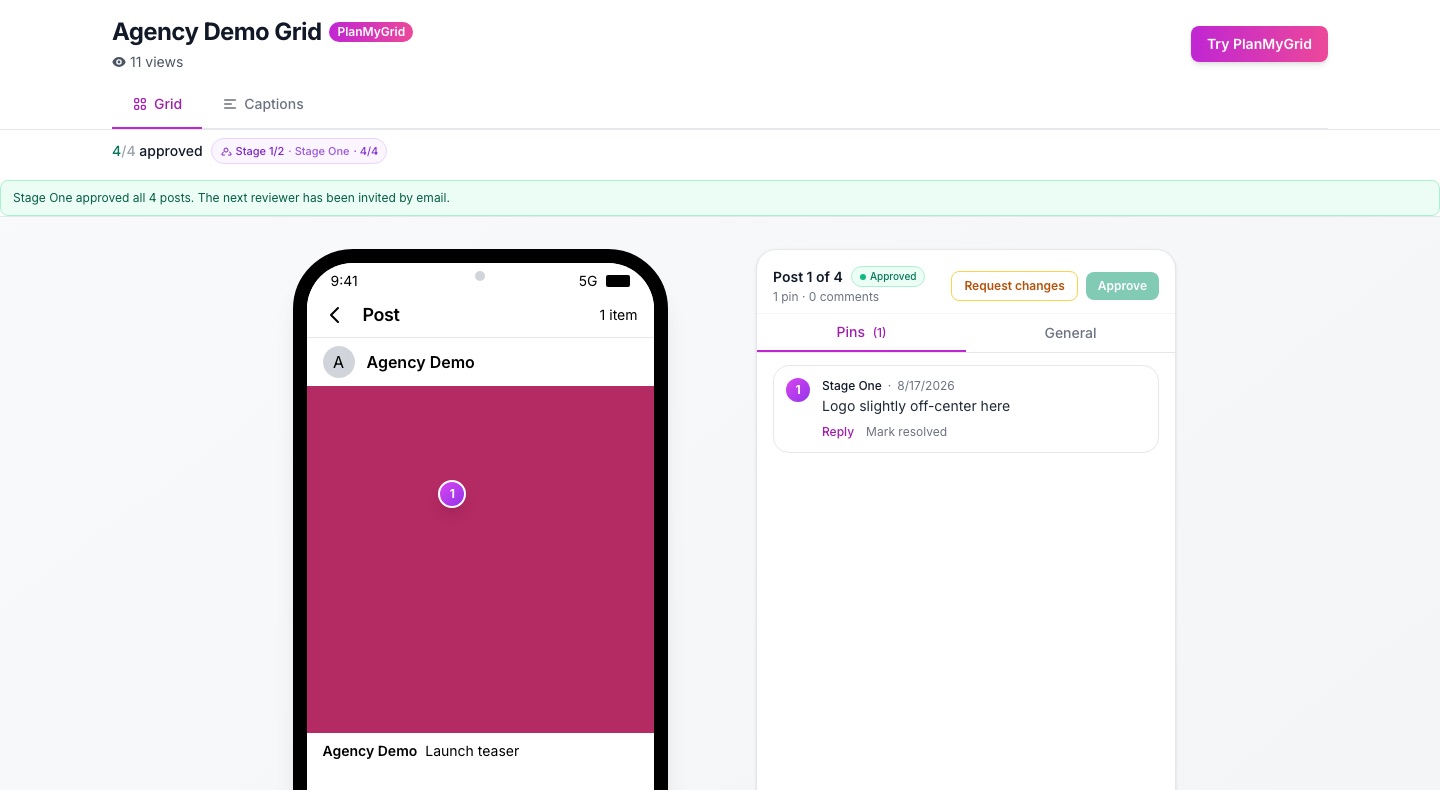
What does the client see on the share page?
- • The grid in a phone frame, in the order you planned, including Reels covers and carousels.
- • Stories and Highlights that play inside the same frame, the way they will on the profile.
- • A Captions tab (Studio and Agency) that lists each post with its caption, for clients who review copy more than images. They can save it as a PDF.
- • Approval status in approval mode: how many posts are approved and, with a reviewer chain, which stage the review is at.
Nothing to install and no password to remember. The page works on a phone, which is where most clients will open it.
How do you get approval, not just a look?
A preview answers “do you like it?”. Approval answers “can we post it?”, and you want that answer on record. In PlanMyGrid approval mode (Studio and Agency):
- • Each post is approved or sent back with a reason, so one problem post does not hold up the rest.
- • A reviewer chain sends the link to reviewers in order, for example the client's marketing lead first and their manager second. The next reviewer is invited by email when the stage before them is done.
- • Versions keep each round, so you can see what the client approved and what changed after.
- • A signed-off share can be reopened when the plan changes late.
For the full process, read the client approval workflow for agencies and the guide to sequential reviewer chains.
Which PlanMyGrid plan do you need?
| Feature | Free | Pro | Studio | Agency |
|---|---|---|---|---|
| Share links (client needs no account) | 1 link | Unlimited | Unlimited | Unlimited |
| Grid, Reels, Stories and Highlights in a phone frame | Yes | Yes | Yes | Yes |
| Client comments and pins on posts | Yes (you see the latest) | Yes | Yes | Yes |
| Per-post approve or request changes | No | No | Yes | Yes |
| Reviewer chain, due date, versions | No | No | Yes | Yes |
| Captions tab and save as PDF | No | No | Yes | Yes |
| Your brand name and logo on the page | No | No | Yes | Yes |
| Your own domain, no PlanMyGrid branding | No | No | No | Yes |
| Price per month | $0 | $9 | $29 | $99 |
Prices are in USD. See pricing for annual plans.
What about other tools?
Most Instagram planners can show a feed preview, and several have their own way to share or approve content, including Later, Planoly, Plann and Planable. What each one includes, and on which plan, changes often, so check their current pricing pages before you decide.
Where PlanMyGrid differs: the share link is built around the grid itself, the client never needs an account, and per-post approval, reviewer chains and white-label sit on the same link. For side-by-side detail, see PlanMyGrid vs Later, PlanMyGrid vs Planoly and PlanMyGrid vs Planable.
Frequently asked questions
What is the best way to show a client their Instagram grid before posting?
Send a live share link from a grid planner. The client opens it in a browser without an account and sees the planned feed in the real order, in a phone frame, with Reels, Stories and Highlights. In PlanMyGrid the client can also comment on a single post and, on Studio and Agency, approve each post or request changes on the same page.
Does my client need an account to see the preview?
No. A PlanMyGrid share link opens in any browser, on a phone or a computer, without a login or an app.
Can I share an Instagram grid preview for free?
Yes. The PlanMyGrid free plan includes one share link for one grid. Pro ($9 per month) gives unlimited share links. Client approval (approve or request changes on each post) starts on Studio at $29 per month.
What happens when I change the grid after I send the link?
A share link shows a saved copy of the grid, so the client never sees half-finished edits. When you are ready, update the link (or submit a new version in approval mode) and the client sees the new plan at the same URL. In approval mode, earlier versions stay available.
Can the client see captions, not just images?
Yes, on Studio and Agency. The share page has a Captions tab that lists every post with its caption, and the client can save the plan as a PDF.
Can the preview link use my agency's brand instead of PlanMyGrid?
On Studio and Agency the share page shows your workspace name and logo. On Agency you can put share links on your own domain, which also removes the PlanMyGrid branding.
Related reading
Send your first grid preview
Plan a grid and share it free. Upgrade to Studio when the client needs to sign off.