
Best UNUM Alternative for Instagram Grid Planning in 2026
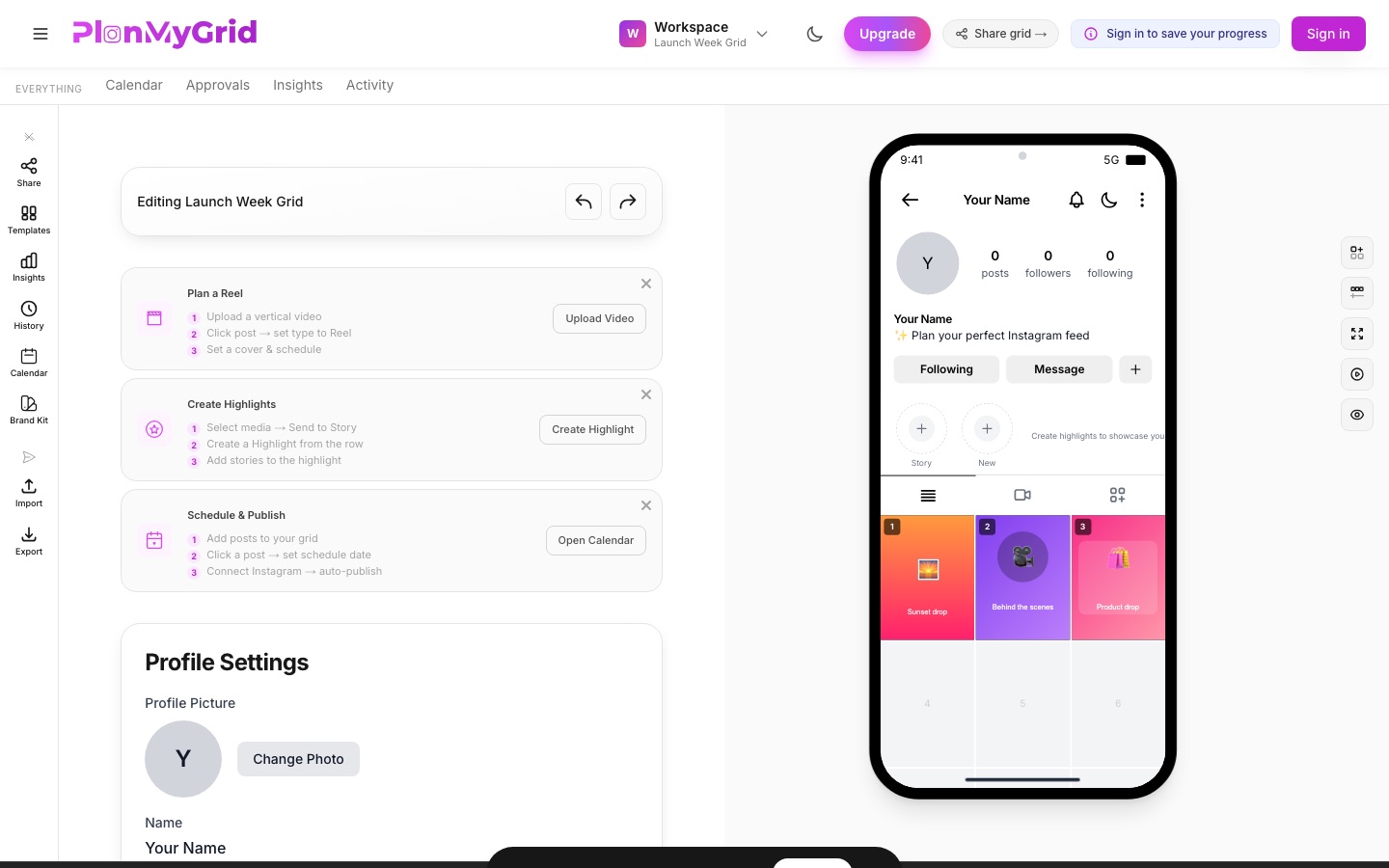
PlanMyGrid is a free UNUM alternative for people who plan Instagram content with clients. UNUM runs on the web, iOS and Android; PlanMyGrid runs in any browser and starts free with no signup. Both do drag-and-drop grid reordering with a live feed preview; the differences are the price model, offline editing, the share link a client reviews without an account, and what each free plan holds.
The Verdict
PlanMyGrid is a strong UNUM alternative for anyone who plans Instagram content with clients. Both tools let you plan from desktop or mobile — UNUM on the web, iOS and Android, PlanMyGrid in any browser. PlanMyGrid adds share links that clients can open, comment on, and (on Studio) approve without creating an account, plus offline editing with cloud sync and no account needed to start. The free plan includes 1 active grid and 20 media uploads; Pro is $9/month with unlimited AI captions and direct Instagram publishing.
Try PlanMyGrid free — no credit card required — or read the full breakdown below.
Why Creators Are Switching from UNUM in 2026
UNUM has been a go-to Instagram grid planner since 2015, and it remains a capable planner on the web, iOS and Android. The two most common reasons creators look for an alternative are workflow-driven: how AI use is priced across plans, and how a plan gets in front of a client for review — PlanMyGrid sends a link the client simply opens and comments on, with no account.
UNUM's Pro plan is $7/month, but unlimited AI captions and hashtags require its Teams plan at $10/month. PlanMyGrid takes a different approach: a free tier that covers casual creators, and a single $9/month Pro plan that unlocks unlimited grids, unlimited AI, direct Instagram publishing, and no-login client share links.
Whether you are a solo creator, a freelance social media manager, or an agency handling multiple client accounts, this comparison will help you decide if PlanMyGrid is the right UNUM alternative for your workflow. You can also check our top 10 Instagram grid planner tools for 2026 for a broader comparison.
Feature-by-Feature: PlanMyGrid vs UNUM
| Feature | PlanMyGrid | UNUM |
|---|---|---|
| Platform | ✅ Web app in any desktop, laptop, or phone browser — installs to your home screen | ✅ Web (app.unum.la), iOS and Android — plan from desktop or mobile |
| No-Login Client Sharing | ✅ Share links clients open in a browser — no account needed | ⚠️ Team workspaces for collaboration; no-login client review not confirmed on UNUM's site |
| Client Approval Workflow | ✅ Comments on Free and Pro; per-post approve/reject with no client login on Studio ($29/mo) | ✅ Team workspaces for approvals |
| Drag-and-Drop Grid Preview | ✅ Drag-and-drop reordering with live grid preview | ✅ Drag-and-drop grid reordering with feed preview |
| AI Captions & Hashtags | ✅ AI captions, hashtags, and bio generator — 2 free tries each, unlimited on Pro ($9/mo) | ✅ Magic Caption and Magic Hashtags — 5 AI credits on Free, unlimited on Teams ($10/mo) |
| Feed Color Tools | ✅ AI color analysis of your feed palette | ✅ Color Map view of your grid's palette |
| Publishing & Scheduling | ✅ Direct Instagram publishing for grid posts, Reels, Stories, and Carousels (Pro) | ✅ Auto-post and multi-platform scheduling |
| Free Plan | ✅ 1 active grid, 20 media uploads, 1 share link, 2 free AI generations (total) | ✅ 1 user, 20 uploads/month, 1 GB, 5 AI credits |
| Grid History & Snapshots | ✅ Full history tracking with snapshots — undo any layout change | ❌ Not an advertised feature |
| White-Label Sharing | ✅ Custom share domain and branded emails on Agency tier | ❌ Not an advertised feature |
Grid Planning & Preview
Both PlanMyGrid and UNUM let you upload photos and rearrange them in a 3-column Instagram grid layout. You can preview how your feed will look before posting, on desktop or mobile with either tool. The differences are offline editing, grid snapshots, and how you share a plan with a client.
PlanMyGrid
- Drag-and-drop with live grid preview
- Grid history and snapshots — undo any change
- Offline-first — works without internet
- Export grids as PNG, JSON, or ZIP
- Shareable grid links (no login needed for viewers)
UNUM
- Drag-and-drop grid reordering
- Visual feed preview with the ability to hide existing posts
- Color Map view of your grid's palette
- Web, iOS and Android apps
- Team workspaces for collaboration and approvals
AI Features
Both tools now ship AI writing features. UNUM offers Magic Caption and Magic Hashtags, but meters them with AI credits — 5 on the free plan — and only removes the cap on its Teams plan ($10/mo). PlanMyGrid gives every AI feature 2 free tries, then makes all of it unlimited on the single $9/mo Pro plan.
PlanMyGrid AI Suite
- AI caption writer — generates on-brand captions for each post
- AI hashtag suggestions — targeted hashtags based on your content
- AI color analysis — identifies your feed's color palette for cohesion
- AI bio generator — craft the perfect Instagram bio
- 2 free AI tries on the free plan, unlimited on Pro
UNUM
- Magic Caption — AI caption generation
- Magic Hashtags — AI hashtag suggestions
- 5 AI credits on the free plan
- Unlimited AI credits only on Teams ($10/mo)
- Color Map for palette overview on paid plans (not AI analysis)
Publishing & Scheduling
Both tools offer ways to get your content published to Instagram, but they take different approaches. UNUM offers multi-platform scheduling, while PlanMyGrid focuses on combining Instagram planning with direct publishing and a built-in content calendar.
PlanMyGrid
- Direct Instagram publishing (Pro)
- Content calendar with email reminders
- Plan, write AI captions, and publish from one tool
- Visual grid preview before publishing
UNUM
- Auto-post and scheduling — unlimited on paid plans
- Calendar view for planned posts
- Multi-platform: Instagram, TikTok, Facebook, LinkedIn, Pinterest, YouTube, X, Threads
- Built-in analytics on paid plans
Client Collaboration
If you manage Instagram accounts for clients, the collaboration workflow matters as much as the planning tools. UNUM offers team workspaces for collaboration and approvals. PlanMyGrid's flow is built for external clients: send a link, the client opens it in a browser with no account and comments per post, and on Studio ($29/month) approves each post.
PlanMyGrid
- Shareable grid links — clients view without logging in
- Per-post client sign-off and reviewer chains (Studio)
- Feedback and comments on grid items
- Share analytics for each grid link
UNUM
- Team workspaces for collaboration and approvals
- Workspaces by plan: 2 on Pro, 10 on Teams
- Free plan: 1 user
Pricing & Value: PlanMyGrid vs UNUM
UNUM's Pro plan is $7/month ($5.25/month billed annually), but unlimited AI requires Teams at $10/month. PlanMyGrid keeps it simple: a free tier, one Pro plan with unlimited AI, and Studio for client sign-off.
| PlanMyGrid Free | PlanMyGrid Pro | UNUM Paid | |
|---|---|---|---|
| Monthly Price | $0 | $9/mo | $7/mo (Pro), $10/mo (Teams) |
| Annual Price | $0 | $79/yr ($6.58/mo) | $5.25/mo billed annually (Pro) |
| Platform | Web (any browser) | Web (any browser) | Web, iOS, Android |
| Active Grids / Workspaces | 1 grid | Unlimited grids | 1 user (Free), 2 workspaces (Pro), 10 (Teams) |
| Media Uploads | 20 | Unlimited | 20/month and 1 GB (Free), unlimited storage (Pro) |
| AI Captions & Hashtags | 2 free tries | Unlimited | 5 credits (Free), unlimited on Teams |
| No-Login Client Sharing | 1 share link | Unlimited | Not confirmed |
| Client Approval | Comments only | Comments (sign-off on Studio, no client login) | Team workspaces for approvals |
| Direct Publishing | Pro only | Included | Unlimited scheduling on paid plans |
While UNUM's plans cost less per month, PlanMyGrid Pro at $9/month includes unlimited AI plus no-login client sharing and comments (sign-off on Studio). UNUM meters AI with credits below its Teams plan. For the full breakdown, see our pricing page.
Why Creators Switch from UNUM to PlanMyGrid
- Start planning in any browser without an account
- Unlimited AI captions, hashtags, and color analysis on Pro — no credit metering
- Offline-first workflow — plan your grid without internet
- Free forever tier — no time limits, no forced upgrades
- Direct Instagram publishing and content calendar
- Clients comment with no login; per-post sign-off on Studio
- Grid history and snapshots — never lose a layout
- Multiple export formats: PNG, JSON, ZIP
- Full profile planning — Reels with custom covers, Stories, Highlights, and Carousels
About UNUM
UNUM is a visual planner and grid layout tool on the web, iOS and Android, with scheduling, analytics, AI captions and hashtags, a Color Map, and a link-in-bio builder. It has been around since 2015 and supports Instagram, TikTok, Facebook, LinkedIn, Pinterest, YouTube, X, and Threads.
UNUM's strengths are its long track record, apps on the web and on phones, and multi-platform scheduling. The main differences from PlanMyGrid are the price model (AI credits are metered below Teams) and the client workflow (PlanMyGrid adds offline editing and no-login client share links).
UNUM's paid plans start at $7/month for Pro ($5.25/month billed annually), with Teams at $10/month for unlimited AI credits and 10 workspaces. The free plan includes 1 user, 20 uploads/month, 1 GB of storage, and 5 AI credits.
If you want a free UNUM alternative with no-login client sharing and unmetered AI on one plan, PlanMyGrid is built for that.
Who Should Switch from UNUM to PlanMyGrid?
Solo Creators
If you are a content creator or influencer who plans content at a desk — batching photos, writing captions, lining up a cohesive aesthetic — PlanMyGrid's browser-based planner fits that workflow, works offline, and needs no account to start. The free tier covers 1 grid and 20 uploads.
Freelancers
Freelance social media managers need to share grid plans with clients for approval. PlanMyGrid's shareable links (comments on Free and Pro, sign-off on Studio) eliminate the back-and-forth of screenshots and emails — and your client never has to create an account.
Agencies
Agencies managing multiple client accounts benefit from PlanMyGrid's unlimited grids on Pro, client approval workflows on Studio, and AI-powered content creation. The time saved on captions and hashtags alone makes the switch worthwhile.
Frequently Asked Questions
What is the best UNUM alternative in 2026?
It depends on how you work. Both UNUM (web, iOS and Android) and PlanMyGrid (any browser) let you plan from desktop or mobile. PlanMyGrid fits if you want to start without an account, edit offline with cloud sync, and send clients share links they comment on with no login — free to start, $9/month for Pro with unlimited AI, and client sign-off on Studio ($29/month). UNUM's paid plans cost less per month ($7 Pro, $10 Teams).
Is PlanMyGrid free to use as a UNUM replacement?
Yes. PlanMyGrid offers a free forever plan that includes 1 active grid, 20 media uploads, a comments-only share link, and 2 free AI tries. No credit card required. You can upgrade to Pro ($9/month) for unlimited grids, the full AI suite, direct publishing and watermark-free exports. Client sign-off and reviewer chains are Studio ($29/month).
Can I publish directly to Instagram from PlanMyGrid?
Yes. PlanMyGrid Pro lets you publish posts directly to Instagram from your grid planner. Plan your feed visually, write AI captions, then publish — all from one tool.
How does PlanMyGrid compare to UNUM for grid planning?
Both tools offer drag-and-drop grid planning with a visual feed preview, and both work on desktop and mobile: UNUM on the web, iOS and Android, PlanMyGrid in any browser (it installs to your home screen). The differences are in the workflow: PlanMyGrid needs no account to start, edits offline with cloud sync, keeps grid history with snapshots, and gives you share links that clients open and comment on without logging in.
Does PlanMyGrid work offline?
Yes. PlanMyGrid uses an offline-first architecture. You can upload photos, rearrange your grid, and plan your entire feed without an internet connection. Your changes sync automatically when you go online.
Is PlanMyGrid a good UNUM alternative?
Yes, especially for creators, freelancers, and agencies who review plans with clients. It matches UNUM on core grid planning features like drag-and-drop reordering and visual feed preview, then adds no-login client share links, offline editing with cloud sync, grid history with snapshots, and unlimited AI captions and hashtags on Pro at $9/month, plus per-post client sign-off on Studio at $29/month — UNUM meters AI credits below its Teams plan at $10/month.
Can I import my UNUM content to PlanMyGrid?
PlanMyGrid makes it easy to get started. While there is no direct one-click import from UNUM, you can export your images from UNUM and upload them to PlanMyGrid in bulk using drag-and-drop. Once uploaded, you can immediately start arranging your grid, adding AI captions, and scheduling posts.
How is PlanMyGrid different from UNUM?
PlanMyGrid's differences from UNUM: you start planning in a browser without an account, you edit offline with cloud sync, clients open share links and comment without creating an account, Studio ($29/month) adds per-post client sign-off with reviewer chains, grid history keeps snapshots, and the Agency tier adds white-label sharing on a custom domain. PlanMyGrid Pro at $9/month also includes unlimited AI captions and hashtags, while UNUM limits AI credits below its Teams plan.
Is PlanMyGrid really free?
Yes, PlanMyGrid is truly free with no hidden costs. The free plan includes 1 active grid, 20 media uploads, a comments-only share link, a content calendar, and 2 free AI tries. There is no trial period — the free plan lasts forever. You only need to upgrade to Pro ($9/month or $79/year) if you want unlimited grids, unlimited uploads, full AI features, direct publishing, and watermark-free exports. Client sign-off and reviewer chains sit on Studio ($29/month).
Compare with Other Instagram Grid Planners
PlanMyGrid vs Preview App
Free forever vs paid-only web access
PlanMyGrid vs Plann
Grid planning vs content scheduling
PlanMyGrid vs Later
Dedicated grid planner vs multi-platform tool
PlanMyGrid vs Planable
Grid-first planning vs multi-network approval
Top 10 Grid Planners in 2026
Full comparison of every Instagram grid planner
Ready to switch from UNUM?
Start planning your Instagram grid for free. No credit card required. Upload your content, arrange your grid in the browser, and send your first no-login share link in minutes.