
Best Canva Alternative for Instagram Grid Planning in 2026
Canva is a design tool. PlanMyGrid is a dedicated Instagram grid planner. Here is how they compare for feed planning, publishing, and AI features.
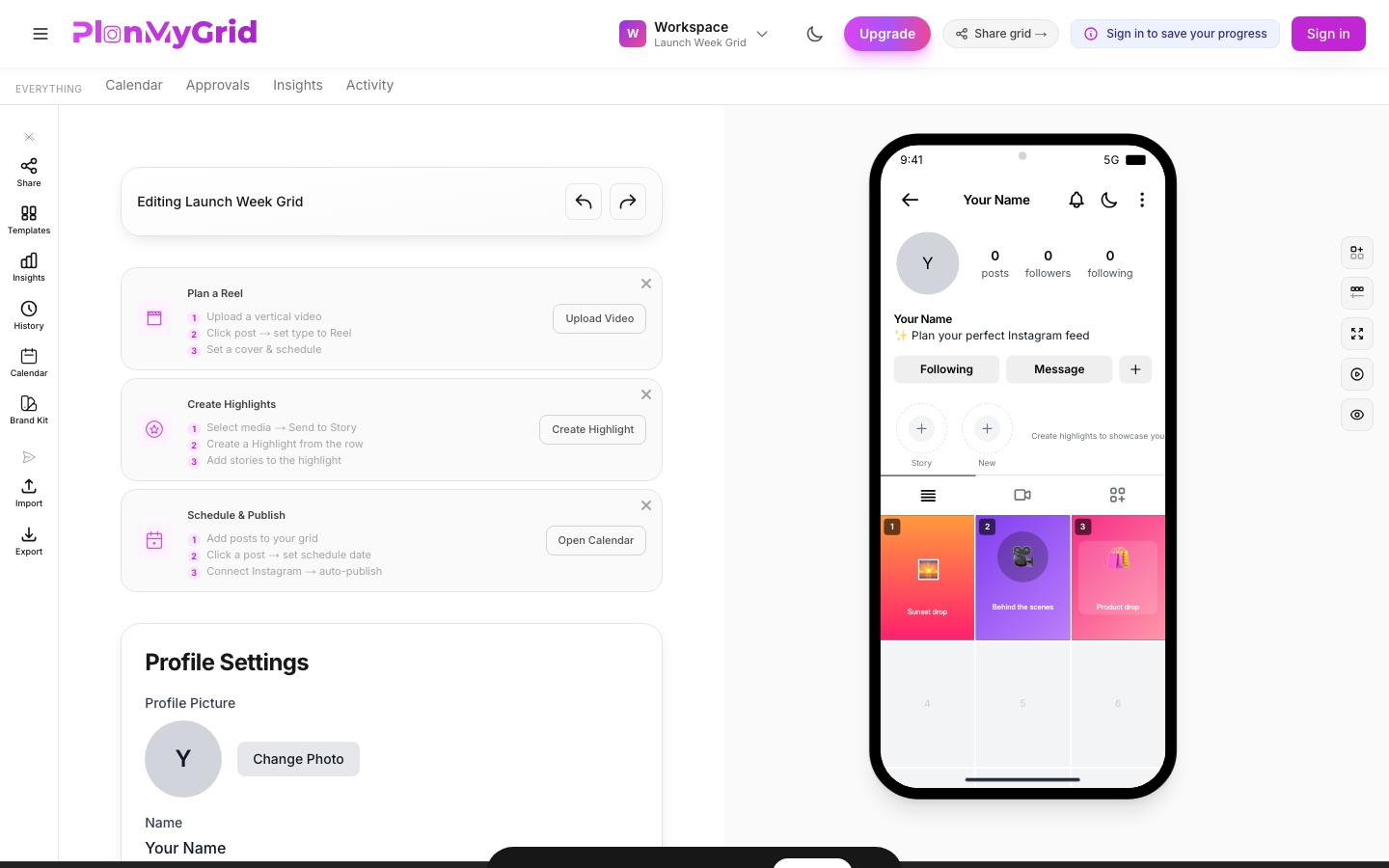
Canva is great for designing posts, but it was never built for grid planning. PlanMyGrid gives you drag-and-drop feed reordering, live grid preview, AI captions, and client approval — all purpose-built for Instagram. Read the full breakdown below or try PlanMyGrid free right now.
The Verdict: Canva for Design, PlanMyGrid for Feed Planning
Canva is a general-purpose graphic design tool with a basic content planner; PlanMyGrid is a dedicated Instagram grid planner. Canva is the better tool for designing individual posts, stories, and reels. PlanMyGrid is the better tool for planning your feed: drag-and-drop grid reordering, live profile preview, AI captions and hashtags, client approval, and direct Instagram publishing.
They are complements, not substitutes — the most common workflow is to design posts in Canva, then upload them to PlanMyGrid to arrange, preview, approve, and publish the grid. PlanMyGrid Pro costs $9/month vs Canva Pro at $12.99/month (annual billing), and PlanMyGrid's free tier includes grid planning that Canva does not offer at any price.
Why Canva Is Not an Instagram Grid Planner
Canva is the world's most popular design tool, and for good reason. It makes graphic design accessible to everyone with thousands of templates, drag-and-drop editing, and AI-powered features like Magic Write and Magic Media. Many Instagram creators use Canva to design individual posts, stories, and reels.
But designing posts and planning your grid are two different workflows. Canva has Instagram grid templates, but they are static layouts — you cannot drag and drop posts to rearrange your feed, see a live preview of how your profile will look, or track your grid history with snapshots. There is no client approval workflow for grid layouts, no offline editing, and no Instagram-specific AI for captions or hashtags.
PlanMyGrid is purpose-built for the grid planning workflow that Canva does not cover. Many creators use both tools together — design in Canva, plan in PlanMyGrid. For a broader comparison of all grid planning tools, see our top 10 Instagram grid planner tools for 2026.
Feature-by-Feature: PlanMyGrid vs Canva
| Feature | PlanMyGrid | Canva |
|---|---|---|
| Dedicated Grid Planner | ✅ Purpose-built Instagram grid planner with live feed preview | ❌ General design tool with Instagram grid templates |
| Drag-and-Drop Grid Reordering | ✅ Drag-and-drop posts to rearrange your Instagram feed layout | ❌ No drag-and-drop reordering for Instagram feed previews |
| Live Feed Preview | ✅ See exactly how your Instagram grid will look before posting | ❌ No live Instagram feed preview — template-based only |
| AI Captions & Hashtags | ✅ AI-powered captions, hashtags, and bio generator for Instagram | ❌ AI image generation but no Instagram-specific caption or hashtag AI |
| Offline-First Workflow | ✅ Works offline, syncs when ready | ❌ Requires internet connection for all editing |
| Client Approval Workflow | ✅ Built-in client approval and feedback on grid layouts | ❌ No client approval workflow for Instagram grids |
| Grid History & Snapshots | ✅ Full history tracking with grid snapshots | ❌ Version history for designs but no grid-specific snapshots |
| Reels, Stories & Highlights | ✅ Visual Reels planning with custom covers, Stories queue, Highlights, and Carousel builder | ❌ Design templates for stories/reels but no feed-integrated planning or Highlights |
| Direct Instagram Publishing | ✅ Publish directly to Instagram from the grid planner | ✅ Social media scheduling via Content Planner (Pro only) |
| Design Templates | ⚠️ Focused on grid layout planning, not graphic design | ✅ Massive template library for all design types |
| AI Image Generation | ✅ AI color analysis for feed cohesion | ✅ Text-to-image AI generation (Magic Media) |
| Free Tier | ✅ Free forever with 1 grid, 20 uploads, and client approval | ✅ Free tier available but grid planning features are limited |
| Share & Collaboration | ✅ Shareable grid links with analytics — no login required | ✅ Team collaboration on designs (Pro feature) |
Grid Planning
Grid planning is the core difference between PlanMyGrid and Canva. Canva lets you design beautiful individual posts, but it has no tools for arranging those posts into a cohesive Instagram feed layout. PlanMyGrid is built entirely around this workflow.
PlanMyGrid
- Live 3-column Instagram grid preview
- Drag-and-drop to rearrange post order
- Grid history and snapshots — undo any layout change
- Shareable grid links (no login needed for viewers)
- Export grids as PNG, JSON, or ZIP
Canva
- Instagram grid templates (static layouts)
- No drag-and-drop feed reordering
- No live feed preview
- No grid-specific sharing or snapshots
- Download individual post designs
Design Tools
This is where Canva shines. If you need to create Instagram post graphics from scratch, Canva's template library and design editor are unmatched. PlanMyGrid focuses on what happens after you have your images ready — arranging them into a grid, previewing the layout, and publishing.
PlanMyGrid
- Upload finished images for grid planning
- AI color palette analysis for feed cohesion
- Works with any image source (Canva, Photoshop, phone)
- Offline-first — edit without internet
Canva
- Thousands of Instagram post templates
- Full graphic design editor
- Stock photos, icons, and fonts library
- Brand kit for consistent design (Pro)
AI Features
Both tools offer AI features, but they serve different purposes. Canva's AI is designed for graphic design — generating images, writing general text, and removing backgrounds. PlanMyGrid's AI is specifically built for Instagram content creation — captions, hashtags, color analysis, and bios.
PlanMyGrid AI Suite
- AI caption writer — Instagram-optimized captions
- AI hashtag suggestions — targeted for reach
- AI color analysis — feed palette cohesion
- AI bio generator — craft the perfect Instagram bio
- 2 free AI tries, unlimited on Pro
Canva
- Magic Write — general-purpose text generation
- Magic Media — text-to-image generation
- Background remover (Pro)
- Magic Eraser (Pro)
- No Instagram-specific caption or hashtag AI
Publishing & Scheduling
Canva Pro includes a Content Planner that lets you schedule posts to social media platforms. PlanMyGrid takes a different approach — you plan your grid visually first, then publish directly to Instagram when your layout looks perfect.
PlanMyGrid
- Direct Instagram publishing (Pro)
- Content calendar with email reminders
- Visual grid preview before publishing
- Publish with AI-generated captions and hashtags
Canva
- Content Planner for scheduling (Pro only)
- Multi-platform publishing
- No grid-aware publishing — posts are scheduled individually
- No feed preview before publishing
Pricing: PlanMyGrid vs Canva
Canva Free is generous for design work, but if you want grid planning features, scheduling, and AI tools, you need Canva Pro at $12.99/month. PlanMyGrid's free tier covers casual grid planning, and Pro at $9/month unlocks everything including AI and client approval.
| PlanMyGrid Free | PlanMyGrid Pro | Canva Pro | |
|---|---|---|---|
| Monthly Price | $0 | $9/mo | $14.99/mo |
| Annual Price | $0 | $79/yr ($6.58/mo) | $155.88/yr ($12.99/mo) |
| Grid Planning | Included | Unlimited grids | Not available |
| AI Captions & Hashtags | 2 free tries | Unlimited | Not available |
| Graphic Design | Not included | Not included | Full design suite |
| Client Approval | Pro only | Included | Not available |
| Direct Publishing | Pro only | Included | Content Planner |
| Offline Editing | Included | Included | Not available |
Canva Pro is a great value for graphic design, but it does not include grid planning features. PlanMyGrid Pro is more affordable and purpose-built for Instagram feed planning. For the full breakdown, see our pricing page.
Why Choose PlanMyGrid Over Canva for Grid Planning?
- Purpose-built for Instagram grid planning — not a general design tool
- Drag-and-drop feed reordering with live grid preview
- Instagram-specific AI — captions, hashtags, color analysis, bio generator
- Offline-first workflow — plan your grid without internet
- Client approval workflows — share grids without requiring logins
- Grid history and snapshots — never lose a layout
- Plan Reels with custom covers, Stories, Highlights, and Carousels in one place
- More affordable — $9/month vs Canva Pro at $12.99/month
About Canva
Canva is a popular online graphic design platform used by millions of people worldwide. It offers a drag-and-drop editor, thousands of templates, stock photos, and AI-powered design tools. Canva is excellent for creating Instagram posts, stories, presentations, and marketing materials.
Canva Free provides access to basic design features and templates. Canva Pro ($12.99/month annual or $14.99/month monthly) adds premium templates, Brand Kit, Magic Write, Magic Media, background remover, and a Content Planner for social media scheduling.
While Canva is a powerful design tool, it was not built for Instagram grid planning. If you need to plan how your posts will look together on your profile, rearrange your feed layout, or get client approval on grid designs, PlanMyGrid is the better choice.
Frequently Asked Questions
Can I use Canva as an Instagram grid planner?
Canva has Instagram grid templates that let you design individual posts, but it is not a dedicated grid planner. Canva does not offer live feed preview, drag-and-drop grid reordering, or a way to see how your posts will look together on your Instagram profile. PlanMyGrid is purpose-built for grid planning and gives you all of these features in its free tier.
Is PlanMyGrid a good Canva alternative for Instagram grid planning?
Yes. If your goal is to plan and preview your Instagram grid layout, PlanMyGrid is the better tool. Canva excels at graphic design, but PlanMyGrid is specifically designed for Instagram feed planning with drag-and-drop reordering, live preview, AI captions, and client approval workflows.
Is PlanMyGrid cheaper than Canva Pro?
Yes. PlanMyGrid offers a free forever plan with 1 grid and 20 media uploads. Pro starts at $9/month or $79/year. Canva Pro costs $12.99/month (annual billing) or $14.99/month (monthly billing). If you only need Instagram grid planning, PlanMyGrid gives you more relevant features at a lower price.
Does Canva have drag-and-drop grid reordering?
No. Canva lets you design individual Instagram posts using templates, but it does not have a drag-and-drop interface for rearranging posts in your Instagram feed layout. PlanMyGrid is built around this workflow — you can drag and drop posts to see exactly how your grid will look before publishing.
Does PlanMyGrid have design tools like Canva?
PlanMyGrid is a grid planner, not a graphic design tool. It focuses on arranging, previewing, and publishing your Instagram grid. If you need to design individual posts, you can use Canva for that and then upload the finished images to PlanMyGrid for grid planning. The two tools work well together.
Can PlanMyGrid generate AI captions like Canva's Magic Write?
Yes. PlanMyGrid includes AI-powered caption writing, hashtag suggestions, color palette analysis, and a bio generator — all specifically tuned for Instagram. Canva's Magic Write is a general-purpose text generator that is not optimized for Instagram content. PlanMyGrid's AI features are included in Pro ($9/month) with 2 free tries on the free plan.
Does Canva offer a live Instagram feed preview?
No. Canva does not show you how your posts will look together on your Instagram profile grid. You can design individual posts, but there is no feed preview. PlanMyGrid shows you a live 3-column grid preview so you can plan your entire feed aesthetic before posting.
Should I use Canva or PlanMyGrid for Instagram?
Use both. Canva is excellent for designing individual Instagram posts, stories, and reels. PlanMyGrid is the better tool for planning your overall grid layout, rearranging posts, previewing your feed, and publishing. Many creators design in Canva, then upload to PlanMyGrid to plan their grid and publish.
Compare with Other Instagram Grid Planners
PlanMyGrid vs Preview App
Free forever vs paid-only web access
PlanMyGrid vs Later
Dedicated grid planner vs multi-platform tool
PlanMyGrid vs UNUM
Best UNUM alternative with AI features
PlanMyGrid vs Plann
Grid-first planner vs scheduling suite
PlanMyGrid vs Planoly
Best Planoly alternative for grid planning
PlanMyGrid vs Planable
Grid-first planning vs multi-network approval
Top 10 Grid Planners in 2026
Full comparison of every Instagram grid planner
Ready to plan your Instagram grid?
Design in Canva, plan in PlanMyGrid. Start for free — no credit card required.